
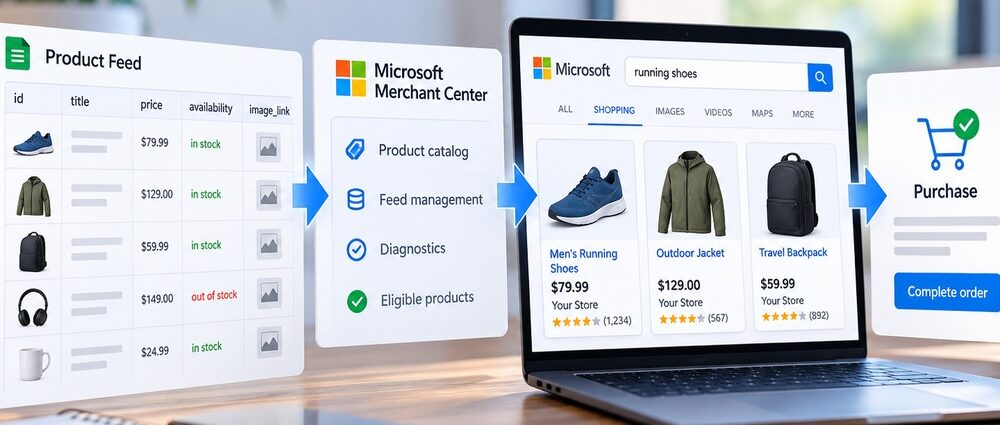
Microsoft Shopping campaigns turn product data into ads that can appear when people search for items sold by an ecommerce business. Unlike a standard Search campaign, the advertiser is not writing a separate text ad and choosing a list of positive keywords for every product. Microsoft uses information from the catalog to determine which products can appear and how to present those offers.
That changes where optimization begins. Titles, prices, availability, images, identifiers, categories, and feed structure all shape the information Microsoft receives before bids or campaign settings have much influence.
Advertisers already using the broader Microsoft Advertising platform can view Shopping as a connected chain:
Product Feed → Merchant Center → Shopping Campaign → Product Group → Product Ad → Search Query → Purchase
If one part of that chain is weak, higher bids rarely solve the underlying problem. A catalog with stale prices, rejected products, vague titles, or poor segmentation can limit performance long before media spend becomes the main constraint.
What Microsoft Shopping Campaigns Do in 2026
Microsoft Shopping campaigns are built for retailers that want individual products to appear in visual shopping placements. The ads are Microsoft Product Ads, which can include a product image, title, price, business name, and other shopping details before the user visits the product page.
Microsoft’s current Shopping campaigns overview describes a setup centered on Microsoft Merchant Center and a product catalog. The same retail ecosystem can also support features such as Merchant Promotions, Local Inventory Ads, dynamic remarketing, and Google Ads imports where they fit the account.
Many advertisers still refer to these formats as Bing Shopping Ads or Bing Product Ads, although Microsoft Shopping campaigns and Product Ads are the current terminology.
The important distinction from conventional Search advertising is the source of the ad information. Microsoft generates Product Ads from catalog data, so the campaign inherits the strengths and weaknesses of that data. An incorrect price, rejected offer, weak title, missing product information, or poor image can reduce the usefulness of the campaign before bid strategy becomes the main issue.
From Product Feed to Product Ad
A Microsoft Shopping campaign begins with the catalog rather than with ad copy. The usual path looks like this:
Store → Product Feed → Microsoft Merchant Center → Shopping Campaign → Product Group → Product Ad → Shopper → Sale
The feed contains structured information about products available for advertising. Microsoft Merchant Center receives and processes those offers before eligible inventory can participate in Shopping campaigns.
From there, Microsoft combines catalog information with the shopper’s query and campaign settings to determine what can serve. Advertisers still control important levers such as campaign scope, product grouping, bids, exclusions, and budget, but they do not normally write a unique Product Ad for every SKU.
For a retailer with a large or frequently changing catalog, feed management therefore belongs inside the paid media process. Inventory, pricing, merchandising, and advertising may sit with different teams, yet the Shopping campaign depends on those systems staying aligned. A pricing or stock change that never reaches the feed can undermine ad accuracy before anyone notices a problem in the campaign interface.
Microsoft Merchant Center and the Product Feed
Microsoft Merchant Center stores the catalog used by Shopping campaigns. The advertiser needs an eligible store and product feed linked to the website, and the offer information should match what shoppers see after clicking through.
Feeds also require maintenance. Prices change, inventory disappears, new products launch, and old products are discontinued. A catalog that was accurate at launch can become unreliable quickly when product data changes every day.
Microsoft’s Merchant Center feed guidance states that a feed expires after 30 days if it is not updated and describes daily uploads as a good practice for keeping information fresh. For active ecommerce catalogs, automated synchronization is usually safer than occasional manual uploads.
Which Product Feed Fields Matter Most?
Some attributes primarily help identify the product, while others affect how clearly the offer can be understood or organized. The table below focuses on fields with clear practical consequences rather than reproducing the full feed specification.
| Field | What It Controls | Common Problem |
|---|---|---|
| Title | Product meaning and visible wording | Generic or poorly structured titles |
| Description | Additional product context | Thin or irrelevant copy |
| Image | Main product visual | Low-quality or mismatched images |
| Price | Advertised product price | Feed and landing-page values differ |
| Availability | Whether the item is currently offered | Out-of-stock inventory remains active |
| Brand | Product identity | Missing or inconsistent naming |
| GTIN / MPN | Product identification where applicable | Required identifiers are missing or incorrect |
| Product type / category | Catalog organization | Broad or inconsistent classification |
| Custom label | Advertiser-defined segmentation | Labels exist without a clear campaign use |
Feed quality is part of campaign quality. A strong bidding strategy cannot rescue a product that is disapproved, inaccurately priced, or described so vaguely that its relevance is difficult to establish.
That is why feed diagnostics deserve attention before aggressive bid changes. Catalog problems can affect hundreds or thousands of items at once, even when the campaign interface itself looks healthy.
Structure Shopping Campaigns Around Products, Not Just Ads
Once products qualify to serve, campaign structure determines how easily advertisers can manage different parts of the catalog. Product groups let advertisers divide inventory by category, brand, product type, item ID, or custom labels.
Leaving a large catalog inside one broad All Products group may simplify setup, but it can hide major differences in commercial value. A high-margin bestseller, an end-of-season item, and a low-margin commodity may need different treatment even if all three belong to the same store.
How Should Shopping Product Groups Be Organized?
There is no single structure that works for every retailer. Useful segmentation reflects differences that can actually change a budget, bid, reporting decision, or inventory strategy.
| Segment | Possible Feed Label | Why Separate It | Main Risk |
|---|---|---|---|
| Best sellers | bestseller | Monitor important volume drivers | Historical volume encourages overbidding |
| High margin | margin_high | Reflect stronger profit potential | Margin labels become outdated |
| Clearance | clearance | Manage liquidation separately | Too much spend follows low-value stock |
| Seasonal | seasonal_q4 | Control short selling periods | Seasonal settings remain active too long |
| Premium brands | premium_brand | Separate different product economics | Traffic becomes over-fragmented |
| Low inventory | stock_low | Limit exposure where supply is tight | Inventory labels are not refreshed |
Custom labels are useful because they can represent business logic that standard product categories do not capture. Margin tiers, promotional status, seasonality, or bestseller status may all matter to the advertiser even though shoppers never see those labels.
More segmentation is not automatically better. Tiny product groups can create maintenance work without producing enough activity to support useful decisions, so the structure should remain as granular as the business actually needs.
Search Terms and Negative Keywords Still Matter
Shopping campaigns are feed-driven, but query analysis is still essential. Product information helps Microsoft determine relevance; actual search terms show how that interpretation behaves once the campaign receives traffic.
A product can be technically eligible and still appear for searches with weak commercial intent. An unexpected query can also reveal useful demand, so the objective is not to eliminate variation but to understand which patterns deserve action.
Do Microsoft Shopping Campaigns Use Keywords?
Standard Shopping does not rely on advertiser-selected positive keyword lists in the same way as a conventional Search campaign. The catalog provides much of the information used to connect products with relevant searches.
Negative keywords still provide a way to exclude unwanted queries. They can help when products attract an unrelated category, informational intent, or another recurring pattern that consistently wastes spend, but broad exclusions deserve caution because they can remove legitimate traffic as well.
Search-term analysis can also point back to the feed. If a product repeatedly appears for the wrong kind of query, another negative keyword may only treat the symptom. The title, description, category, or product type may be sending an unclear signal.
Import Google Shopping Without Importing the Problems
Retailers already running Google Shopping do not necessarily need to rebuild everything manually. Microsoft supports importing Google Merchant Center information and eligible Google Ads Shopping campaigns, which can shorten the initial setup.
Import is a starting point, not a quality check. The platforms have different auction environments, traffic volumes, query mixes, and performance histories, so settings that work in Google Ads still need review after they arrive in Microsoft Advertising.
What Should You Review After Import?
A practical post-import check should cover:
- Merchant Center store linkage;
- target market and language;
- product titles and descriptions;
- price and availability;
- product groups;
- custom labels;
- budgets;
- bidding settings;
- campaign priority;
- negative keywords;
- conversion tracking;
- rejected or inactive products.
Imported structures can carry old assumptions. A custom label may reflect a merchandising strategy that is no longer used, while a product group that once represented an important category may now contain very little inventory.
The value of import is speed, but that advantage should not remove the review stage. The Microsoft campaign will eventually be judged against revenue, not whether the migration completed successfully.
Track Sales and ROAS After the Click
Shopping performance becomes meaningful when advertisers connect product traffic with purchases and revenue. Reliable Microsoft Shopping conversion tracking should carry the measurement beyond the click and record the commercial action the retailer actually cares about.
A useful path is:
Product Impression → Product Ad Click → Product Page → Purchase → Revenue
Purchase tracking should also pass transaction value where possible. Without revenue data, two conversions with very different order values can look identical in campaign reporting, which makes ROAS and product-level comparisons far less useful. Impressions, clicks, and conversion rate still matter, but product economics can make apparently strong traffic misleading: one item may attract clicks and rarely sell, while another may convert regularly but carry too little margin to justify its acquisition cost.
Platform-wide Microsoft Advertising benchmarks can provide context, but a Shopping advertiser eventually needs its own product, category, and offer baselines. Those internal comparisons become more useful as purchase data accumulates.
Metrics worth following include:
- conversion rate;
- cost per purchase;
- purchase revenue;
- return on ad spend;
- conversion value by product;
- performance by product group;
- performance by search term;
- margin or contribution value where available.
ROAS helps compare products with different selling prices, but it is not identical to profitability. A product returning $5 in revenue per advertising dollar can still be less attractive than one returning $4 if the first item has much weaker margins or higher fulfillment costs.
Product-level segmentation makes those differences easier to see. A campaign-wide average can look healthy while a relatively small group of products generates most of the profitable revenue.
Microsoft Shopping Campaigns vs Performance Max in 2026
Standard Shopping is no longer the only feed-based retail option in Microsoft Advertising. Performance Max uses substantially more automation and can extend beyond the narrower Shopping workflow across Microsoft’s inventory.
The practical decision is not whether automation is inherently better. It is how much direct product-level control the account needs and whether broader automated distribution supports the objective.
| Area | Microsoft Shopping Campaign | Performance Max |
|---|---|---|
| Product feed | Supported | Supported |
| Catalog organization | Direct Shopping product-group controls | Uses the feed within a more automated campaign structure |
| Manual control | More product-focused controls | Greater reliance on automation |
| Automation | Moderate | High |
| Reach | Shopping-focused placements | Broader Microsoft inventory |
| Query visibility | Shopping search-term workflow | Search-term reporting with less direct Shopping control |
| Negative keywords | Supported | Self-serve support added in 2026 |
| Creative approach | Primarily product-feed driven | Feed plus broader campaign assets |
| Practical fit | More direct catalog control | Broader automated reach and optimization |
This is a practical comparison rather than a prediction of which campaign type will win. A retailer may prefer standard Shopping when granular catalog control matters and use Performance Max where broader automated reach better fits the goal.
What Happened to Smart Shopping Campaigns?
Older account structures and tutorials may still refer to Smart Shopping campaigns. Microsoft’s Smart Shopping documentation states that Microsoft deprecated Smart Shopping and upgraded existing campaigns to Performance Max. Advertisers can no longer create new Smart Shopping campaigns.
Standard Microsoft Shopping campaigns did not disappear. They remain a current campaign type, while Performance Max has taken over the role of Microsoft’s more automated successor to Smart Shopping. The distinction matters because Smart Shopping and standard Shopping are not interchangeable names for the same campaign type.
Performance Max controls continued to expand during 2026, so advertisers should make decisions using the current product rather than feature lists from its earlier rollout.
How to Improve Microsoft Shopping Campaigns After Launch
Shopping optimization works best when feed health, product structure, query quality, and commercial results are reviewed together. A useful sequence is:
- Fix feed errors before changing bids. Disapproved, stale, or inaccurate products need a data fix before they need more spend.
- Improve product titles and images. Make them specific, accurate, and useful to someone comparing products.
- Keep price and availability current. Feed information should remain aligned with the product page.
- Separate products with different economics. High-margin, clearance, seasonal, and best-selling inventory may warrant different treatment.
- Review search terms. Look for irrelevant intent, unexpected demand, and signs that product data is unclear.
- Add negative keywords selectively. Remove persistent waste without blocking useful query variations.
- Monitor disapprovals. A growing rejected-product count can quietly reduce campaign coverage.
- Compare product-level revenue and ROAS. Campaign averages can conceal weak inventory.
- Use Merchant Promotions or Local Inventory Ads where the business and inventory model support them.
- Reassess campaign type. Standard Shopping and Performance Max offer different balances of control and automation.
The order matters because bidding changes cannot repair broken product data. Retail organizations also need clear ownership across feed maintenance, inventory, pricing, advertising, tracking, and merchandising. When those responsibilities are fragmented, Shopping performance can deteriorate even while each individual system appears to function correctly.
Businesses that lack the internal resources to manage product data, campaign structure, measurement, and merchandising may compare specialist ecommerce marketing agencies with an in-house approach. External campaign management still depends on accurate catalog information and reliable commercial data from the retailer.
Microsoft Shopping campaigns work best when the feed and campaign are treated as parts of the same sales system. Product data determines what Microsoft receives, campaign structure determines how inventory can be controlled, and purchase data shows whether the resulting traffic created value. Advertisers should therefore judge a Shopping campaign by more than its ability to generate clicks. The stronger test is whether the campaign turns accurate catalog data into sales at economics the business is willing to sustain.