
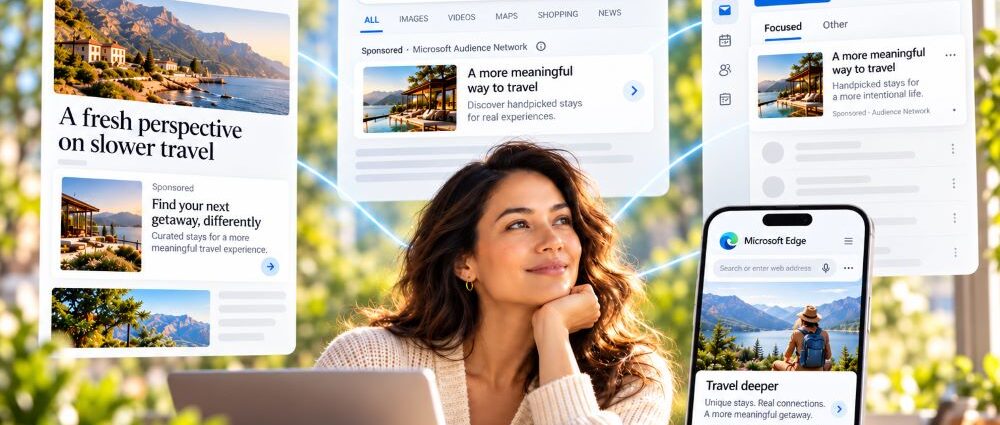
Microsoft Audience Ads give advertisers a way to reach people outside the moment of an active search. Instead of relying mainly on the words someone types into a search box, Microsoft can use audience signals, context, previous interactions, and other intent data to decide when an ad may be relevant.
That makes Audience campaigns fundamentally different from ordinary paid search. A Search campaign usually starts with demand that already exists, while an Audience campaign can reach someone earlier, later, or between searches. For advertisers already using the broader Microsoft Advertising platform, that distinction matters because the same account can support very different types of traffic.
The terminology can also cause confusion. Bing native ads and Bing native advertising still appear in older industry usage, but Microsoft now places these formats inside the broader Audience Ads ecosystem. Native is one format within that system rather than a synonym for the entire product.
The Microsoft Audience Network provides the broader inventory environment where many Audience ads can appear, while Audience Ads are the formats and campaign options advertisers use to reach those users. Keeping those two concepts separate makes the rest of the platform easier to understand.
What Microsoft Audience Ads Actually Do in 2026
Microsoft Audience campaigns can use Display, Native, and Online Video formats. Ads can appear across Microsoft properties and eligible partner inventory, giving advertisers access to people who may not be actively searching at the moment they see the message.
Microsoft’s current Microsoft Display and Native ads information emphasizes visually rich advertising across Microsoft consumer properties and partner sites. Native placements are designed to fit the surrounding experience, while display formats can behave more like conventional image-based advertising.
That flexibility creates both an advantage and a problem. Advertisers can reach people across more contexts, but the creative still has to make sense when the layout, crop, device, or surrounding content changes.
Microsoft Audience Ads therefore play a different role from classic paid search. They extend Microsoft advertising into audience-led visual placements where intent may exist without an active query. A person can still have strong commercial interest even when that interest appears through previous behavior, professional attributes, content consumption, or other signals rather than a search performed seconds earlier.
Target People, Not Just Queries
Search and Audience advertising start the match in different places. Search begins with a query, so someone has already asked for a product, service, solution, or piece of information before Microsoft decides which ads may fit.
Audience advertising starts more broadly. Microsoft can use information about interests, previous activity, purchase intent, first-party audiences, and professional signals to decide which people may be relevant for an advertiser.
Microsoft’s current audience targeting tools include in-market audiences, remarketing, Customer Match, LinkedIn profile targeting, predictive targeting, and other audience options.
This does not mean keywords stop mattering everywhere in the account. It means advertisers need a different mental model: instead of asking only which query triggered an ad, they also need to understand why Microsoft considered a particular person or context relevant enough to receive it.
Which Microsoft Audience Targeting Options Matter Most?
Different audience types solve different problems, so stacking every available option into one ad group rarely improves clarity. The better approach is to choose targeting based on what the campaign needs to learn or accomplish.
| Targeting Type | Best Use | Main Limitation |
|---|---|---|
| In-market audiences | Reaching people showing category-level purchase intent | Category intent may still be broader than the advertiser’s offer |
| Remarketing | Re-engaging previous site visitors | Requires enough previous traffic to build useful lists |
| Customer Match | Reaching known customers or leads | Depends on usable first-party customer data |
| LinkedIn profile targeting | B2B segmentation by company, industry, or job function | Professional attributes do not always equal immediate buying intent |
| Predictive targeting | Finding additional likely converters | Gives Microsoft more freedom to expand beyond manually selected audiences |
| Location and demographics | Basic market qualification | Broad filters usually need stronger intent signals around them |
LinkedIn profile targeting remains one of Microsoft’s more distinctive options. Advertisers can use professional information such as company, industry, and job function, which can make Audience campaigns particularly useful for some B2B offers.
Predictive targeting works differently. Microsoft can use ad content, landing pages, and audience intelligence signals to look for additional people who may convert. That extra reach makes clean conversion tracking more important because the system needs a reliable definition of success rather than a shallow engagement event.
Where Microsoft Native Ads Actually Appear
Bing native ads are not simply visual ads placed beside Bing search results. Native inventory extends into environments where people may be reading, checking email, browsing content, playing games, or moving through other Microsoft experiences.
The surrounding context changes how the ad competes for attention. Someone scanning a search results page has already expressed intent through a query, whereas someone reading an article or checking an inbox may not be actively shopping at that moment. Native creative therefore has to earn attention through relevance, message clarity, and timing.
That difference affects measurement as well as messaging. A Search ad can respond directly to stated demand; a native ad may introduce a product, reinforce an earlier interaction, or reach someone before that person enters an active comparison stage.
Microsoft has also expanded contextual control for Audience ads. Advertisers can use placement and topic signals to make more deliberate decisions about where ads appear instead of treating the Microsoft Audience Network as one undifferentiated pool of inventory.
Context should still support the audience strategy rather than replace it. A relevant page can improve the environment around an ad, but the person seeing the message still needs a reason to care about the offer.
How Search Ads Reach the Microsoft Audience Network
Audience traffic does not always come from a standalone Audience campaign. Microsoft can also extend eligible Search creative into native placements, which is one reason Audience delivery can appear inside an account that an advertiser primarily thinks of as paid search.
Microsoft’s current Audience Ads documentation distinguishes standalone Audience campaigns from Search ads extended to native placements. Search creative assets such as titles, text, URLs, and image extensions can support native delivery, with the final presentation adapting to the placement where the user encounters it.
Someone reading Outlook or browsing another Microsoft property may therefore encounter a very different presentation from someone using a search results page even though the creative originated in a Search campaign. That distinction matters during analysis because traffic from two different user contexts can sit closer together than an advertiser expects.
Standalone Audience Campaign or Search Extension?
The two approaches can access native inventory, but they serve different operational purposes.
| Area | Standalone Audience Campaign | Search Campaign Audience Delivery |
|---|---|---|
| Primary logic | Audience-led | Search campaign with additional eligible native delivery |
| Targeting | Built around audience and contextual signals | Starts from the Search campaign structure |
| Creative | Designed specifically for Audience placements | Often reuses Search creative and image extensions |
| Budget control | Separate campaign budget | Uses the Search campaign’s existing structure |
| Testing | Easier to isolate Audience performance | Audience effects may require closer reporting review |
| Best use | Dedicated prospecting, remarketing, or audience strategy | Extending an existing Search campaign’s reach |
Neither approach is automatically better. A separate Audience campaign makes sense when the advertiser wants clean budget ownership, tailored creative, and distinct audience testing. Extending Search can reduce setup work, but it demands closer reporting because traffic from different contexts can sit inside the same broader campaign structure.
The useful question is not simply which method generated more clicks. If Audience delivery increases volume but weakens downstream lead quality or sales efficiency, campaign-level averages can hide the tradeoff.
Creative Has to Survive the Placement
Search ads benefit from context that the advertiser does not have to create. Someone searching for “commercial accounting software” has already explained a large part of the problem before the ad appears.
Audience creative cannot rely on that advantage. A person may encounter the ad while reading an article, checking email, or moving through another content experience, so the image and headline need to establish relevance without help from a visible query.
That usually means treating image selection as part of the message rather than decoration. A polished image can still fail when the subject becomes unclear after cropping, the visual looks generic, or the headline only makes sense beside a particular search term.
What Makes Audience Creative Work?
A practical creative check should ask whether the ad still communicates its purpose across several different placements.
- keep the main subject visually obvious;
- avoid placing essential information near the outer edges of an image;
- make the headline understandable without keyword context;
- use imagery that matches the actual offer rather than a generic industry visual;
- keep embedded text inside images to a minimum;
- maintain a clear connection between the ad promise and landing page;
- preview how the creative behaves across multiple shapes and devices.
Native advertising rewards fit, but fit does not mean invisibility. The message still needs a reason for someone to stop, understand the offer, and click.
Search copy often leans heavily on immediate action because the user has already expressed intent. Audience copy can benefit from slightly more explanation, particularly when the person has not yet reached the final stage of a buying decision.
Measure the Click by What Happens After It
Audience campaigns can produce inexpensive traffic, but a lower CPC does not automatically mean a better campaign. Measurement needs to follow visitors beyond the initial click and connect media activity with the outcome the business actually values.
For a lead-generation campaign, the useful chain might look like this:
Audience Impression → Site Visit → Form Submission → Qualified Lead → Sales Outcome
An ecommerce campaign may care more about:
Audience Impression → Product Visit → Purchase → Revenue → Margin
Those later steps separate traffic that merely looks efficient from traffic that creates commercial value. A campaign that generates cheap visits but few qualified leads or profitable purchases may simply be buying inexpensive attention.
Reliable Microsoft Audience Ads conversion tracking depends on Universal Event Tracking and conversion goals that reflect real business value. This becomes especially important when Microsoft uses automation or predictive targeting. If the campaign optimizes toward a weak event, the system may become very efficient at finding people who complete that event without finding the customers the business actually wants.
Platform-wide Microsoft Advertising benchmarks can provide outside context, but Audience campaigns need their own baselines. Search and Audience traffic behave differently enough that forcing both into the same expectation can make a healthy campaign look weak or a weak campaign look healthy.
Cheap Traffic Is Not the Same as Good Traffic
Native and display inventory often introduces a tempting metric: low CPC. That number can be useful, but it becomes dangerous when a team treats it as the main proof of campaign quality.
A campaign that cuts CPC in half while producing leads that sales rejects is not necessarily more efficient. The same problem appears with CTR: a strong image or headline can attract attention without attracting the right buyer, while a more selective ad may generate fewer clicks but better conversion economics.
Separate Audience Quality From Traffic Volume
A useful reporting sequence moves from the cheapest metric toward the most commercially important one:
- Impressions show how much eligible reach the campaign receives.
- CTR shows whether the creative earns attention.
- CPC shows what that attention costs.
- Conversion rate shows whether visitors take the desired action.
- CPA shows what each conversion costs.
- Qualified-lead rate or revenue shows whether those conversions have real business value.
- ROAS, margin, or sales outcomes show whether the campaign economics are sustainable.
Not every advertiser can measure every stage immediately, but the analysis should not stop at the first metric that looks good. Cheap attention has little value when the people behind it consistently fail to become useful leads or customers.
Placement quality deserves attention as well. A campaign may perform well overall while a small set of environments produces weak engagement or poor downstream results. Segmenting results by placement, audience, and creative can expose problems that campaign averages conceal.
When Microsoft Audience Ads Make the Most Sense
Audience campaigns become more useful when an advertiser has a reason to reach people outside an immediate keyword search. Remarketing is an obvious example: someone who researched a product yesterday may still be valuable today even when that person is no longer actively searching.
B2B advertisers can also gain something unusual from Microsoft’s professional audience signals. Company, industry, and job-function targeting can complement the more search-driven tactics used in Microsoft Ads for B2B, particularly when the buying process involves a narrow professional audience.
Other strong use cases include:
- reaching in-market prospects before they run a highly specific search;
- promoting visually understandable ecommerce offers;
- building awareness around a new product or category;
- using content context to reach relevant audiences;
- reaching narrowly defined professional audiences in B2B;
- supporting longer sales cycles where one search click rarely closes the deal.
Audience Ads do not replace Search in every case. When demand is highly explicit and users already search for a narrow service with strong commercial intent, Search may still provide the cleaner route to that demand.
Creative resources matter too. A company that cannot produce appropriate imagery, test multiple messages, or maintain landing-page consistency may get more immediate value from a tightly controlled Search campaign before adding broader Audience activity.
How to Improve Microsoft Audience Campaigns After Launch
Audience optimization works better when advertisers separate targeting, creative, placement, and conversion quality instead of changing everything at once. That makes it easier to identify what actually improved performance.
A useful operating sequence is:
- Separate Audience reporting from Search wherever possible. Different traffic sources deserve different baselines.
- Check where ads appeared. Look for placement patterns rather than judging the entire network from an account-wide average.
- Test audience types deliberately. In-market, remarketing, Customer Match, LinkedIn targeting, and predictive targeting answer different questions.
- Avoid excessive targeting layers. Narrowing an audience repeatedly can leave the campaign with too little room to learn.
- Build creative for multiple placements. Review crops, image clarity, headlines, and landing-page continuity before scaling spend.
- Track the real conversion. Optimize toward purchases, qualified leads, or another action that has business value.
- Compare cheap clicks with downstream quality. CPC savings matter only when later-stage results remain acceptable.
- Refresh creative when performance weakens. Audience ads can lose effectiveness when the same visual runs too long against the same people.
- Use predictive targeting with measurement discipline. Give automation a useful success signal before giving it more reach.
- Reassess the role of the campaign. Some accounts need Search, some need Audience, and many perform better when each channel handles a different part of the buying journey.
Audience Ads work best when Search and Audience are given different jobs. Search can capture explicit demand, while Audience campaigns can create additional opportunities before, after, or between those searches.
The strongest Microsoft Audience Ads strategies use audience, context, and creative to find people that keyword targeting alone would miss, then judge those campaigns by what happens after the click. More reach only becomes valuable when the business can turn that attention into qualified leads, sales, or other outcomes worth paying for.