
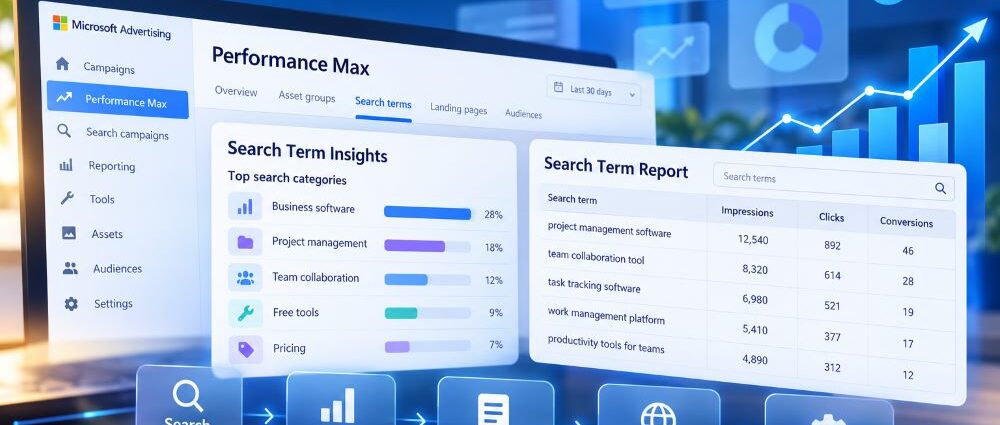
Microsoft Performance Max search term reporting is easier to find in 2026. Advertisers can examine PMax search intent through Search Term Insights, which groups queries into categories, and review visible individual queries in the broader Search Term Report. The two views serve different purposes. Neither turns an automated campaign into a conventional keyword-targeted Search campaign.
The useful question is what to do with a query once it appears. Does it fit the offer? Can the assets and landing page serve that intent? The answer also depends on what happens after the reported conversion, not just on the wording of the search.
What Changed in Microsoft Performance Max Search Term Reporting?
Microsoft expanded Performance Max reporting during spring 2026. Its May announcement covered search-term visibility alongside landing-page and publisher reporting. On August 31, the company clarified that PMax search terms, previously available through Search Term Insights, could also be viewed in the Search Term Report. Agencies gained a more familiar way to include those queries in reviews across campaigns and accounts.
An analyst can now investigate PMax queries in a familiar report while retaining the focused Insights view for an individual campaign. Microsoft’s August 2026 update presents this as improved access to reporting, not a move toward manual keyword control.
The chronology matters. The August change was not a promise that every auction or query would become visible in October. Search-term visibility had been discussed months earlier, and the detail available may still differ by report, date range, and account.
Search Term Insights vs. Search Term Report
Despite the similar names, the two views answer different operational needs. Search Term Insights organizes PMax queries into search categories; the Search Term Report places individual, reportable queries into a more general reporting workflow.
An analyst diagnosing one campaign may want a concentrated view of its query patterns. Someone reviewing several accounts may prefer the standardized report. Both approaches are valid, but the available columns, filters, and breakdowns need to be checked in the chosen view. The same report name does not guarantee identical detail in every account.
| Reporting View | Best Used For | Important Limitation |
|---|---|---|
| Search Term Insights | Reviewing PMax search categories and the query patterns within them | Its categories can include queries not individually displayed in the standard report; it is not a full auction log |
| Search Term Report | Reviewing search queries through a familiar report and combining PMax with broader reporting workflows | The visible query set and available breakdowns depend on report definitions and data thresholds |
| PMax Landing Page Reporting | Checking which destination URLs receive Performance Max traffic | A landing-page report does not by itself tell you which search phrase was paired with every URL |
| Search Term Landing Page Report | Connecting queries, delivered headlines, and final URLs in the relevant Search/AI Max reporting context | Do not assume this report is a dedicated PMax query-to-URL view |
Search Term Insights Is the PMax-Specific Starting Point
For a specific campaign, start with the search categories in Insights, then inspect any visible Microsoft PMax search terms within them. Competitor names, support requests, job searches, and out-of-area locations matter more as recurring patterns than as isolated rows; otherwise, a single phrase can dictate an arbitrary decision.
Impressions can show which categories and visible queries are prominent, but prominence does not establish commercial value. The Search Insight Performance report described in Microsoft’s API documentation covers Bing traffic, not Yahoo traffic, so its totals should not be treated as all-network PMax results. A frequent term might represent research that later becomes a qualified inquiry, while another may refer to a service the advertiser does not provide. Read the language against the offer, the destination page, and the conversion goal before changing campaign settings.
The Search Term Report Makes Broader Reviews Easier
The Microsoft Advertising Search Term Report is useful when an analyst needs one reporting workflow across Search and PMax. It simplifies comparisons across campaigns, though the rows describe systems with different targeting logic. Keep campaign type visible in any combined export; otherwise the similarities in query wording can obscure meaningful differences in how the traffic was generated.
PMax search themes are signals, not positive keywords with fixed match types. A Search campaign’s keyword structure cannot be used as the template for changing a PMax campaign, which also depends on assets, audiences, goals, and available inventory.
How to Review Microsoft PMax Search Terms
In Microsoft Advertising, locate Search Term Insights or the Search Term Report and select a period long enough to capture meaningful conversion activity. Narrow the view to the relevant PMax campaigns or asset groups where supported. Menu labels can change, so use the report name as your reference instead of relying on a dated click-by-click path. Before drawing conclusions, confirm which campaign types are actually included.
When exporting a query-level report, retain the visible query, campaign identifiers, impressions, and the conversion outcomes relevant to the campaign goal. For Search Term Insights, preserve search-category labels rather than treating every category as an individual query. Include asset-group information only when the selected report provides it. For technical exports, check the scope, supported dimensions, and network coverage in Microsoft’s report types reference rather than combining reports with unlike fields.
A short audit can follow this order:
- Confirm that the view includes the intended PMax campaign and a relevant date range.
- Identify groups of queries about the same need rather than reacting to each phrase individually.
- Compare those groups with the campaign’s search themes, asset groups, offers, and destination pages.
- Check whether conversion reporting is sufficiently complete and whether the campaign has had time to learn.
- Record a proposed change, its rationale, and what would count as an improvement before implementing it.
- Review the results after a suitable learning and conversion window, not immediately after the next few impressions.
The sequence separates observation from intervention. If attribution is incomplete or the campaign counts weak conversions as successes, a longer list of queries will not fix that measurement problem. Address the quality of the underlying outcome before using query data to justify substantial changes.
What the Reports Cannot Tell You
More accessible reporting is not the same as complete visibility. Some individual queries may be absent from the standard Search Term Report even when they contribute to an Insights category. Reporting thresholds, filters, network coverage, and API dimensions can also change which data appears. Do not expect visible query rows to reconcile automatically with all PMax campaign delivery. First establish what the selected report measures.
Because Performance Max serves across search and other eligible inventory, search-term reporting covers only part of its delivery. That boundary matters when comparing query totals with campaign-wide results, even if the selected search report is otherwise complete.
Search Terms Are Not a Map of Every Landing-Page Decision
A search-term report does not show the precise destination page for every query. PMax landing-page reporting addresses URL performance separately, as Microsoft explained alongside publisher reporting in its May PMax reporting update.
The similarly named Search Term Landing Page Report belongs to Microsoft’s AI Max work for Search. In that context, it connects search phrases with ad headlines and final URLs. It is not a universal PMax query-to-page report. If a PMax campaign seems to send visitors to the wrong destination, investigate its landing-page reporting and relevant URL settings rather than inferring a page choice from the query alone.
Missing Queries Do Not Automatically Mean Missing Performance
A short list of individually displayed queries is not, by itself, evidence of failed conversion tracking or withheld sales data. Insights categories may still represent searches that do not appear as separate rows in the standard report. Nor does a long query list prove profitable discovery; in both cases, inspect the report definition before interpreting its size.
Technical comparisons require one more check: the supported networks and dimensions may differ even when two exports both mention Microsoft Advertising. A category-based Insights export and a query-level report do not necessarily aggregate the same information. If the definitions differ, label the datasets separately and explain why their totals are not directly comparable; a clean analysis should not manufacture a complete search history.
Which Search Terms Should Trigger a Change?
A strange-looking search is not necessarily a mistake. Someone researching a free template might later evaluate paid software, while repeated requests for a service the business does not offer point toward a different problem. Frequency is part of the evidence, but so are customer intent, the destination page, and what qualified leads actually need. Do not translate every questionable row into a negative keyword.
| Query Pattern | What to Investigate | Possible Response |
|---|---|---|
| Relevant service or product questions | Whether the asset group and page answer the need clearly | Improve a search theme, creative asset, or landing page where supported |
| Repeated interest in a service the business does not sell | Whether the mismatch is recurring and material | Review supported negative keyword controls or other exclusions |
| Branded searches already served by another campaign | Whether duplication creates meaningful overlap for the account | Compare campaign roles and outcomes before changing controls |
| Research-oriented terms with later qualified conversions | Whether the journey requires more than one interaction | Keep the segment under observation rather than blocking it |
| High-volume queries with poor lead quality | Whether the conversion goal rewards the wrong action | Audit offline quality and qualification signals first |
| Apparently missing long-tail queries | The chosen report, filters, and reporting limits | Check report definitions; do not invent absent data |
Consider project management software advertised to business buyers. If searches for free templates repeatedly produce inquiries from people who will never need the product, exclusion may be justified. But some template researchers eventually evaluate paid software, so check the CRM outcomes before blocking the whole topic. That distinction is especially important in Microsoft Ads for B2B, where lead qualification may happen well after the initial form submission.
Search Themes, Negatives, and Assets Play Different Roles
Search themes offer Performance Max clues about relevant demand; they do not prescribe fixed keyword matches. When a useful topic barely appears in the visible query set, review whether the campaign’s existing themes, assets, and destination pages express it clearly. A theme change is worth testing only when the business can genuinely serve that intent. Adding loosely related phrases to chase more reach makes the next review harder to interpret.
Exclusions constrain delivery rather than suggest opportunities. Microsoft added self-serve PMax negative keywords and negative keyword lists in March 2026, with lists supported at campaign or account level and the same negative match-type behavior as conventional Search. However, Microsoft states that PMax negative keywords apply to Search and Shopping inventory, not every cross-channel placement. Before excluding a term, check the scope and whether it could also block useful demand.
Assets and landing pages are a third lever. Imagine an ad promising an enterprise consultation while its destination emphasizes a self-serve free trial. Even a relevant search term can produce a poor experience if the offer changes along the way. Review the page, conversion action, and asset-group organization before asking search themes to solve what is really a message mismatch. An ecommerce campaign needs the same discipline: product data and landing-page offers should correspond to what the shopper is seeking.
Why Microsoft AI Max Reporting Is Not the Same Thing
Microsoft AI Max changes matching, creative, and URL selection inside Search campaigns, while Performance Max is a different campaign type. Both generate query data, but PMax reporting should not be confused with AI Max’s “AI optimized” labeling or its Search Term Landing Page Report.
During an audit, first confirm the campaign type. For an AI Max Search campaign, use the reporting controls discussed in our Microsoft AI Max overview. For PMax, examine search themes, asset groups, supported exclusions, and cross-channel conversion objectives. The same search phrase can appear in both environments without implying that the same setting caused it. This is why campaign labels belong beside query data in any consolidated review.
Build a Useful Monthly PMax Search-Term Review
Make the monthly review comparable before making it comprehensive. Use the same campaign scope, conversion definitions, and a consistent reporting window, noting any changes since the last review. Then check whether the intent mix has shifted toward new products, earlier-stage research, or regions the business cannot serve.
The response depends on the business model. A retailer could uncover demand for an in-stock product that its feed describes poorly; an improved title or landing page may help more than a new exclusion. A service company could find repeated inquiries for work it never offers, while a lead-generation team might see many form submissions that do not meet qualification standards. Those are three different diagnoses. They should not lead to the same automated response simply because each surfaced in a search-term report.
Record the recurring pattern, the reason for action or inaction, who owns the change, and when it should be reviewed. The log should stop analysts from reopening settled questions without new evidence, while treating “monitor” as a legitimate outcome rather than a failed optimization.
Account-to-account comparisons need additional context. Campaigns differ in goals, search themes, products, geographic coverage, and conversion quality; a single threshold for “good” PMax queries will rarely fit them all. Start with the account’s own historical patterns, and use external figures only as context. The same caution informs our discussion of Microsoft Ads benchmarks: a reference point cannot replace a decision grounded in the advertiser’s own data.
Better Visibility Still Needs Better Decisions
Microsoft Performance Max search term reporting gives advertisers a clearer view of the demand their automated campaigns encounter. The combination of Search Term Insights and the broader Search Term Report makes it easier to investigate recurring query patterns. It does not explain every auction or remove the need to judge business relevance.
Before acting, ask what a proposed change would solve: irrelevant demand, a poor offer match, an incomplete conversion signal, or a reporting misunderstanding. Make the smallest defensible intervention and give it enough time to be evaluated. Query visibility is useful when it sharpens that judgment, not when it simply produces more rows to react to.