
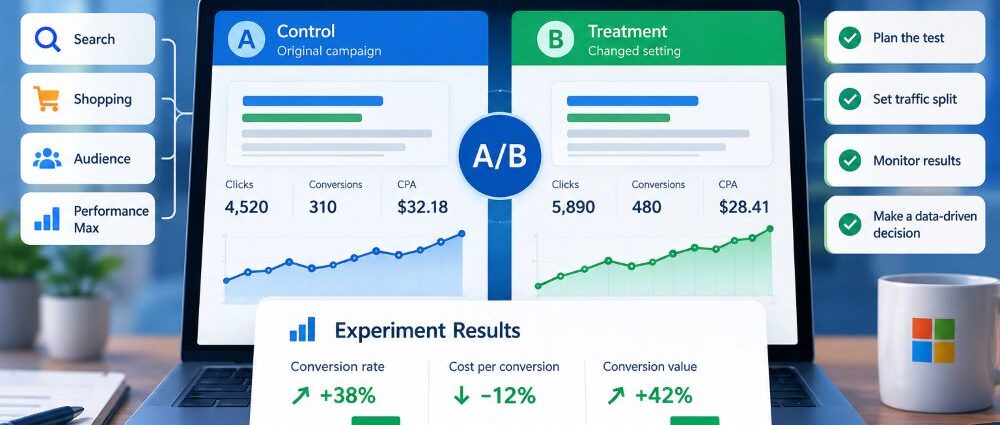
A new bidding target can lift a Microsoft Advertising campaign, but it can also unsettle one that had been performing well, just as broader audience targeting can. Comparing the week before the change with the week after won’t settle the question: customer demand, competitor activity, and conversion delays may have shifted. Even the balance of weekdays in the two reporting windows can affect the apparent result.
Microsoft Advertising optimization experiments compare a proposed adjustment with the existing campaign during the same period. Traffic and budget are allocated between them. This provides a stronger basis for deciding whether to adopt a change than replacing a setup on faith.
On September 30, 2026, Microsoft announced general availability of optimization experiments across Search, Shopping, Audience, and Performance Max. The wider coverage makes testing more accessible, but campaign eligibility and sound experiment design still determine whether the comparison is useful.
What Are Microsoft Advertising Optimization Experiments?
An optimization experiment is a controlled A/B test of an eligible campaign. Microsoft Advertising creates a treatment version from the original, or base campaign, and assigns each arm a specified portion of traffic and budget.
The advertiser makes a planned change in the treatment, perhaps to a bidding target, audience setting, or creative approach, while the control remains the reference point. Microsoft presents results for both versions side by side, making the effect easier to assess. Depending on the workflow, a successful treatment can be applied to the original or converted into a separate campaign.
In A/B testing in Microsoft Advertising, both arms face roughly the same market conditions because they run concurrently. That’s a stronger basis for comparison than judging an account before and after a settings change. It isn’t a substitute for good measurement: traffic allocation, conversion volume, delayed sales, and overlapping campaigns can still obscure the answer.
Microsoft’s September 2026 announcement describes the expanded campaign coverage and shared results experience. The useful outcome is a decision about the account, not simply an experiment marked complete.
Which Microsoft Advertising Campaign Types Support Experiments?
The 2026 expansion covers the four campaign types below. A campaign must still qualify, however, and support for a testable setting in Search does not automatically mean the same test works in Shopping or Audience. The examples describe questions an advertiser might investigate, so confirm the available options before making an experiment part of a production plan.
| Campaign Type | Example of a Useful Test | What to Watch |
|---|---|---|
| Search | Compare bidding strategies or a defined targeting expansion | Search intent, conversion quality, and changes in query mix |
| Shopping | Change a supported bid or targeting setting | Product mix, revenue value, and feed consistency |
| Audience | Test a defined audience or creative approach | Audience overlap, downstream conversions, and delivery quality |
| Performance Max | Compare a supported configuration change against the original | Conversion values, cross-channel effects, and automation learning |
Eligibility is worth checking before writing the test plan. Microsoft’s campaign experiment documentation excludes campaigns with shared budgets, Dynamic Search Ads settings, and mixed campaigns from serving as experiment bases. The documentation also limits a base campaign to ten nonoverlapping experiments, with only one running at a time. If an account relies on an unsupported setup, changing its structure may be necessary before testing. Evaluate that disruption separately from the proposed experiment.
The word experiment also appears in other Performance Max features, which can make the choices sound interchangeable. PMax uplift experiments examine the additional contribution of PMax alongside other campaigns; upgrade experiments address a move toward PMax. Optimization experiments instead compare an eligible campaign with a changed version of itself. Choosing the wrong workflow can leave the advertiser answering a different question from the one it intended to test.
How to Set Up an Optimization Experiment in Microsoft Advertising
To create an optimization experiment in Microsoft Advertising, open Campaigns > Experiments and select Create. Choose an eligible base campaign and the relevant experiment workflow if the account offers more than one type. The detailed help instructions for this menu were written when experiments supported Search only; Microsoft’s September 2026 release expanded eligibility to Shopping, Audience, and Performance Max. Follow the current account interface if campaign-specific steps differ.
Choose One Campaign and a Decision Worth Testing
Choose a campaign with stable enough delivery and dependable conversion tracking to give the test a fair chance, but also make sure there is a meaningful decision behind it. For a software advertiser considering a different bidding target, that might mean increasing sales-qualified demos while keeping cost per opportunity within a defined limit. A well-framed question is more valuable than a test launched simply to explore the interface.
Write the hypothesis while the intended change is still clear. Identify the treatment, the business metric that matters most, and the downside you are willing to accept. “Automation will increase sales” is difficult to evaluate; “a less restrictive bidding target will raise qualified-lead volume without breaching our cost limit” gives the team a real decision rule.
Confirm Eligibility and Create the Treatment
Select the base campaign and confirm it does not use a shared budget or an excluded campaign configuration. Microsoft creates a related experiment campaign by copying the eligible base setup. Check its creation status and any copy errors before proceeding: some expired or legacy entities may not carry over. A missing ad group, keyword, or audience association could undermine the comparison before the treatment begins.
The treatment should differ from the original only where the hypothesis requires it. A creative test that also alters bidding, targeting, and landing pages may generate a better overall result, but it cannot isolate which change helped. Keep the comparison recognizable. A colleague reviewing it later should be able to say precisely what was tested.
Set the Experiment Traffic Split and Dates
A 50/50 allocation generally gives both arms similar opportunities to gather evidence, and Microsoft’s experiment best practices recommend an equal split. A smaller treatment share can reduce exposure to a risky change, although it may take longer to produce a useful answer.
A split allocates the base campaign’s existing budget and traffic between the two arms; creating the test does not automatically double spending. Microsoft’s API permits traffic splits from 1% to 99%, but an active experiment’s split cannot be changed. The treatment budget is inherited from the base campaign, so adjust the base budget rather than trying to set an independent treatment budget. Record the split, budget, and dates before launch.
Microsoft also documents two assignment methods. Search-based splitting randomizes eligible searches, which can show the same person ads from both arms over time. Cookie-based splitting aims to keep a person in one arm, potentially improving consistency for ad-copy or image tests, but it may take longer to gather statistically meaningful data. Confirm which choices the current workflow makes available for your campaign type.
Make the Treatment Change and Check Delivery
After the treatment is created, make the planned change at the scheduled testing point and check that both arms are delivering. Inspect assets, landing pages, and the primary conversion goal; fix any tracking problem before treating results as evidence. Record the date the treatment changed so the evaluation distinguishes an optional identical-arm baseline from the actual A/B comparison.
Avoid unrelated edits to the base campaign during the test. Microsoft cautions that most later changes to the original do not automatically carry through to the treatment, so document any unavoidable adjustment before drawing a conclusion.
How Long Should a Microsoft Ads Experiment Run?
Time alone does not make a comparison reliable. An ecommerce campaign may record enough purchases fairly quickly, whereas a B2B team may wait weeks to learn whether an inquiry was qualified. That delay is common in B2B lead generation with Microsoft Ads, where a recorded lead may not become a qualified opportunity until much later. Both experiment arms need a meaningful sample of normal business activity, so plan the observation window around the conversion process rather than an arbitrary reporting deadline.
Microsoft’s published best-practice example recommends two weeks with identical arms followed by at least two weeks of A/B comparison after the treatment change. The initial identical period establishes a baseline; it is not evidence that the change worked. The example predates the September 2026 expansion to four campaign types, so treat it as guidance rather than a mandatory duration for every workflow. Low-volume or long-cycle accounts may need a longer evaluation window.
Microsoft’s experiment help documentation describes side-by-side metric comparisons and statistical-significance indicators. A reported significant difference can help distinguish a possible effect from random variation, but it does not guarantee that a treatment will perform identically after rollout. The exact confidence controls and presentation may differ across interfaces; do not assume a particular selectable threshold is available without checking your account.
The treatment may appear to lead after just a few days, but that’s a poor reason to end the experiment. Repeated checks and stopping on the most favorable result can make noise look like progress. Decide the minimum run time, primary metric, and guardrails in advance, with early termination reserved for tracking failures, policy issues, serious operational risk, or other genuine problems.
What to Test First in a Microsoft Advertising Experiment
The best first test addresses a consequential account decision. Changing several unrelated settings together may improve performance but leave the team uncertain about what worked, so favor a narrow, clearly documented treatment.
| Change Being Tested | Keep Constant Where Possible | Primary Decision Metric | Common Source of Confusion |
|---|---|---|---|
| Bid strategy or bidding target | Conversion goals, ad copy, audiences | Qualified conversions, CPA, or conversion value | Automation learning and delayed conversions |
| Targeting or distribution | Bids, landing pages, offer | Qualified reach and cost per meaningful result | Different traffic or audience mix |
| Ad message or creative | Offer, audience, bidding logic | Conversion quality and volume | Multiple creative variables changed together |
| Shopping configuration | Product availability, feed consistency | Revenue value and product economics | Feed changes during the test |
A Search advertiser considering Microsoft AI Max for Search may have a testable change, provided the campaign and setting qualify. Rather than modifying several options at once, isolate the one you want to evaluate. Preserve a meaningful control and assess whether the change improves a business outcome, not merely traffic volume.
How to Read Microsoft Advertising Experiment Results
The experiment results screen presents control and treatment together, but the larger number may not represent the better outcome. Begin with basic checks. Did each arm receive the intended share of traffic, and did both use the same conversion definition? Was there an outage or campaign disruption during the comparison? A measurement fault isn’t evidence that a new bid strategy works.
Judge the primary outcome selected before launch: booked jobs for a local service provider, profitable revenue for a retailer, or qualified opportunities for a B2B firm. More recorded leads are not useful if fewer of those leads become real prospects.
For Shopping experiments, review external changes before attributing a difference to the treatment. Stockouts, price adjustments, and product feed updates in Microsoft Shopping can change which items are eligible to serve in both arms. Check whether those events coincided with the test window before drawing conclusions about bidding or targeting.
With an uneven split, raw totals can be deceptive. The smaller arm naturally receives fewer opportunities, even when its performance is stronger. Compare appropriately normalized or platform-scaled results, accounting for costs, rates, and conversion values rather than relying on totals alone. Recent activity may still be underreported because some conversions have not yet occurred or been recorded.
Statistical confidence and business value are separate questions: a small, credible improvement may not cover the disruption of changing a well-running campaign. Conversely, a large apparent gain can still be uncertain if only a few conversions occurred. Avoid searching dozens of tiny device or audience segments after the fact to find a favorable exception; those patterns may be chance.
Optimization Experiments vs. Performance Max Uplift Experiments
These Microsoft Advertising tests answer different questions. Optimization experiments assess a modification to an eligible campaign; Performance Max uplift experiments ask what extra value PMax contributes alongside other activity. Upgrade experiments compare an existing approach with a PMax setup. A result from one type cannot automatically answer the question posed by another.
Microsoft discussed PMax uplift and upgrade experiments in its August 2026 product update, before September’s wider rollout of Optimization Experiments. A test of changes to current targeting or bidding belongs in the Optimization discussion, whereas a question about PMax’s incremental contribution needs the uplift framework. Similar names should not lead to interchangeable conclusions.
Apply the Winning Experiment or Keep the Original?
Before adopting a treatment, check the primary outcome, agreed guardrails, traffic allocation, and conversion delays against sales or revenue data. More attributed conversions should not outweigh a decline in genuine customers.
Microsoft provides options to apply the treatment to the base campaign or make it a standalone campaign. Applying it to the base copies treatment settings back and can overwrite changes made to the base during the test, including newly added ad groups. A standalone campaign gets its own budget and delivery; depending on the workflow, the original may also resume or remain active. Check both campaign statuses and combined budget exposure before proceeding. The API describes a graduated campaign beginning with the base campaign’s budget, so total spend can rise if both campaigns run. Verify bids, goals, tracking, and delivery after either decision.
An inconclusive test can still answer an operational question. Perhaps traffic was too thin, the change too subtle, or the sales cycle longer than the chosen window. Record those limitations and decide whether improved tracking, a simpler hypothesis, or a higher-volume campaign would make another attempt worthwhile.
Common Microsoft Advertising Experiment Mistakes
Many experiments are compromised before anyone opens the reporting screen. A team changes its conversion goal midway through the test, edits the base campaign without recording it, or compares totals without considering traffic allocation. These are the mistakes worth guarding against:
- Testing several major changes at once and then crediting one of them for the result.
- Running an experiment on a campaign with poor or inconsistent conversion tracking.
- Choosing a split that leaves the treatment too little data without adjusting the evaluation plan.
- Editing the original campaign during the test without documenting how comparability changed.
- Treating an early favorable result as a reason to stop, despite a longer planned observation window.
- Calling the treatment a winner from raw conversion totals when traffic allocation was unequal.
- Confusing Optimization with PMax uplift or upgrade experiments.
Record the question, control, treatment, traffic split, dates, primary metric, guardrails, disruptions, and decision in one place. That history helps explain later account changes and avoids running the same uncertain experiment again without realizing it.
When Controlled Testing Is Worth the Effort
Experiments work best when a campaign is stable enough to produce a credible comparison and the proposed change matters financially. If tracking is unreliable or the offer changes every few days, repairing the baseline is likely to be more useful than testing it.
Broader 2026 support for Search, Shopping, Audience, and Performance Max makes experiments easier to include in routine Microsoft Advertising management. The platform can organize a split, show results, and help adopt a successful treatment, but it cannot choose the business question for you. Protect the control, watch for measurement problems, and act only when the difference is commercially meaningful.