
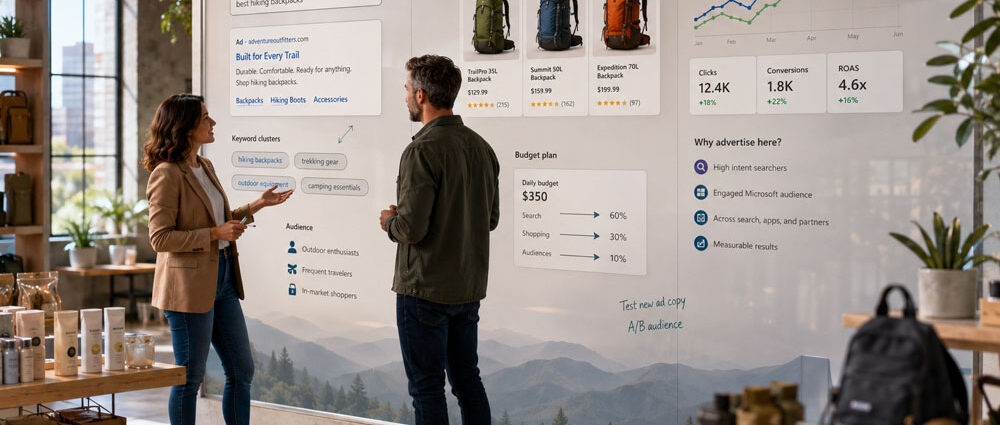
Bing Ads is the older name for Microsoft Advertising, the platform used to run paid search on Bing and eligible partner inventory alongside other ad formats. The name still appears in everyday searches, even though advertisers now manage their campaigns through Microsoft Advertising.
For a business considering another search channel, Google’s larger reach is not the whole story. The question is whether Microsoft can reach people looking for its products or services—and whether the advertiser can connect that activity to meaningful business results.
What Are Bing Ads Called Now?
Microsoft renamed Bing Ads to Microsoft Advertising in 2019 as the product expanded beyond Bing search. The old name remains familiar, but there is no separate Bing Ads account to create or manage.
The naming history is simple:
| Name | Meaning |
|---|---|
| Microsoft Advertising | Current platform name |
| Bing Ads | Former platform name still commonly used |
| Microsoft adCenter | Earlier name of the advertising platform, replaced by Bing Ads in 2012 |
| Microsoft Bing Ads | Informal combination of the old and current branding |
That distinction matters when following older tutorials. Instructions written for “Bing Ads” may use menu labels or campaign options that have changed since the rebrand. The phrase “Bing AdWords” is another naming mix-up: AdWords became Google Ads, while Bing Ads became Microsoft Advertising. They are different platforms, not two names for the same ad account.
How Bing Ads Work on the Microsoft Advertising Network
Bing search ads reach people looking for products, services, or solutions on Bing and eligible partner search placements, including Yahoo and DuckDuckGo where available. The advertiser chooses the intended audience and searches, sets a budget, creates ads, and defines what the campaign should achieve. Microsoft then uses those settings when deciding which ads are eligible to appear.
A basic Bing search advertising campaign follows a familiar paid-search process:
- A user enters a query.
- Microsoft determines which eligible ads may match that search.
- The auction considers factors such as relevance, bid strategy, ad quality, and campaign settings.
- An ad may appear within the search experience.
- The advertiser measures what happens after the interaction, from a website visit to a purchase, call, form submission, or qualified lead.
The auction decides which eligible ads can appear; the business still has to decide whether the resulting traffic is useful. Microsoft’s partner inventory, audience data, automation, and reporting differ from Google’s. Those distinctions matter more as an account expands beyond straightforward keyword targeting.
Where Bing Ads Appear and Which Formats Matter
Microsoft Advertising extends beyond the Bing search results page. Depending on the campaign type and market, ads may also run on eligible search partners, Microsoft properties, or publisher inventory. That range matters because a search ad answering a specific question plays a different role from an audience ad introducing someone to a product.
| Campaign Area | Typical Use |
|---|---|
| Search ads | Reach users actively searching for relevant products or services |
| Shopping campaigns and Product Ads | Promote ecommerce products with feed-based information |
| Audience, display, and native ads | Reach or re-engage users outside traditional search results |
| Performance Max | Run automated campaigns across eligible Microsoft inventory |
| Video and other visual formats | Support awareness and consideration campaigns |
Bing Search Ads answer search queries, while Bing Shopping Ads use product data to show products in eligible shopping placements. By contrast, Bing native ads are designed to resemble surrounding content in eligible Audience and publisher placements; they are not simply search ads shown elsewhere. That distinction matters because a search query expressing buying intent plays a different role from an audience placement used for discovery or remarketing. A local business might concentrate on Search, while a retailer adds Shopping or Performance Max. A B2B advertiser may also test Audience campaigns, depending on its customers and goals.
Eligible Microsoft Advertising campaigns can also place ads in Microsoft Copilot experiences. Text ads, feed-based ads such as Shopping, and multimedia ads from existing Search campaigns may appear alongside relevant AI-generated responses. Advertisers do not need to build a separate Copilot campaign for these placements, although eligibility and inventory determine whether an ad appears. Copilot is an advertising placement opportunity, not a separate campaign type.
Advertisers have some control over search-partner traffic, but not every placement can be excluded individually. Available ad-distribution settings can limit parts of the network, while Website URL reports and supported website exclusions help identify and restrict particular publishers. Some partner traffic is reported in aggregate or belongs to categories that cannot be excluded separately. Review the actual distribution settings and publisher reports instead of assuming a campaign can run exclusively on Bing.com.
Campaign names need care here. As our Microsoft AI Max overview explains, AI Max adds automation to Search campaigns; it is not another standalone campaign type.
How Much Do Bing Ads Cost?
Creating a Microsoft Advertising account is free, but running ads is not. Standard Bing search ads generally follow a pay-per-click model: you pay when someone clicks, with the amount shaped by the auction and your bidding settings. There is no fixed Bing Ads price or universal cost per click. Bing Ads cost depends on the market, keyword competition, geography, audience, bidding strategy, and ad quality. A local campaign may need a very different budget from an advertiser competing for finance, legal, or enterprise software searches. Published CPC averages cannot tell either business what its own results will cost.
There is no single starting budget that makes sense for every Microsoft Advertising account. Microsoft allows advertisers to begin with a small daily budget and increase it as they learn what works. The practical minimum depends on how expensive the relevant searches are and whether the available budget can produce enough activity to evaluate results. A low daily limit may control spending but leave a competitive campaign with too little data to judge.
The useful calculation starts with what happens after someone responds to an ad. Low-priced traffic can be expensive if the inquiries never qualify; a higher CPC may still make sense when customers produce enough value. Set an initial budget the business can evaluate, then judge it against cost per sale, qualified lead, revenue, or pipeline as appropriate.
Bing Ads vs. Google Ads
Google accounts for a much larger share of measured worldwide search-engine referrals. September 2026 data from StatCounter puts Google at 89.94% and Bing at 5.29% across devices. StatCounter measures referrals to websites using its tracking code, not all searches performed or the paid inventory available to advertisers. Those percentages therefore cannot predict an individual campaign’s reach or results.
The picture also changes by market and device. Bing’s share is higher on desktop than on mobile, making a worldwide average a weak substitute for checking the audience a business actually needs. That is one reason advertisers often use Microsoft alongside Google rather than choosing between them outright.
| Factor | Google Ads | Microsoft Advertising |
|---|---|---|
| Search reach | Much larger | Smaller |
| Role in many accounts | Primary paid-search channel | Additional source of search demand |
| Search ecosystem | Google and partner inventory | Bing and Microsoft search partnerships |
| Professional audience data | Google’s own audience ecosystem | LinkedIn-derived professional targeting options |
| Campaign imports | Native Google campaigns | Can import eligible Google Ads campaigns |
Auction pressure varies by industry and geography. Microsoft might offer a lower CPC in one market but too little useful volume in another. A Bing Ads vs Google Ads comparison therefore needs to consider both the demand available and the value of customers acquired. A lower bid or price means little if the campaign cannot reach the right people.
What Changed in Microsoft Advertising in 2026?
Two 2026 developments matter for someone getting to know the platform: Search automation and more detailed B2B audience controls. They are useful capabilities to understand, though eligibility and available settings differ by campaign.
LinkedIn-derived professional targeting is a notable difference for B2B advertisers. Microsoft added Job Seniority for eligible Search and Audience campaigns in its August 2026 update, alongside company, industry, and job-function signals. In September, Microsoft also expanded LinkedIn company lists from 1,000 to 10,000 company names per list for Search and Audience campaigns in supported markets. Those controls can help a software or services advertiser refine promising demand, but they cannot make an irrelevant search query relevant.
AI Max for Search is an optional suite of features that combines search term matching, text customization, and final URL expansion. Microsoft made it generally available in August 2026. Instead of relying only on the initial keyword list, the campaign can explore additional relevant searches. That increases the need to inspect query relevance and landing-page choices, not simply the amount of traffic generated.
How to Advertise on Bing With Microsoft Advertising
To advertise on Bing, start with a Microsoft Advertising Search campaign and a clear goal. Sign up or sign in with a Microsoft account, enter the business and billing details, then create a campaign or import eligible campaigns from Google Ads. The steps below assume the business is trying to reach people already looking for its offer, rather than launch every available campaign format at once. This narrower start makes early results easier to understand.
A Microsoft Advertising account is separate from a Google Ads account, even when both are managed by the same business. Importing a Google Ads campaign copies supported campaign elements into Microsoft Advertising; it does not make the original Google campaign run on Bing. Budgets, billing, conversion tracking, and campaign performance still need to be managed within the Microsoft platform.
Define the Conversion Before Launch
Decide what a useful conversion looks like before spending begins. An online store can measure purchases and revenue; a local business might rely on valid calls or quote requests. For B2B, a form submission often needs further qualification before it becomes a sales opportunity. Configure measurement around that distinction so an apparently successful campaign is not rewarded for sending the sales team unusable inquiries.
Start With Commercial Search Intent
A practical Bing Ads strategy starts with searches that have a plausible connection to the offer. Service and product categories, pricing questions, local searches, and implementation needs may provide a more useful starting point than broad informational topics. Broader targeting can come later, once the account has evidence about which visitors become customers.
Match Ads With Landing Pages
Ad copy should answer the search and make the offer clear. The landing page needs to follow through, not send every visitor to a generic homepage. Someone searching for Shopify SEO services should land on a relevant service page; a buyer researching enterprise software implementation should not have to search the site again to find that offer.
Review Search Terms and Negative Keywords
Negative keywords help prevent obvious mismatches, but the list should evolve with the campaign. Search-term reports show how Microsoft’s matching interprets targeting in practice. An unexpected query may reveal a useful customer need—or show that the campaign is drifting away from the offer. Review patterns before excluding whole topics; automation cannot replace that judgment.
Review Google Ads Imports Before Launch
Microsoft’s Google Ads import tools can save setup work, but an imported campaign is not a finished Microsoft Advertising campaign. Review budgets, locations, bids, audiences, negatives, assets, and the available automation settings before launch.
Check conversion goals, UET tracking, and landing pages as well. Imported settings do not remove the need to verify Microsoft-specific measurement. Even when the structure looks familiar, different search inventory and supported features may produce a different result. Treat the import as a draft to validate, not a performance guarantee.
Where Microsoft Advertising Can Make Sense
The appropriate campaign mix depends on the business, not on the number of formats Microsoft offers. Three common cases illustrate how that decision changes.
Bing Search Advertising for Local Services
Bing search advertising can be useful when nearby customers are already searching for a service. An accountant, home-service company, or consultant might focus on service-and-location phrases rather than broad awareness traffic. Calls, quotes, and booked appointments are better indicators of success than a high visitor count. A small market can still justify a campaign if it delivers enough profitable work.
Bing Product Ads for Ecommerce
Bing Shopping ads are Product Ads built from Microsoft Shopping product feeds. Depending on the listing, shoppers may see images, prices, store names, ratings, or promotions. Accurate feeds and relevant landing pages are essential, but each product category still needs its own performance review. A budget that works in Google Shopping may not make sense for the same products on Microsoft.
Microsoft Ads for B2B Lead Generation
Microsoft’s professional audience signals can add context to B2B search demand. A software provider, for instance, might begin with commercially relevant service queries and then test available company, industry, seniority, or remarketing options. The supported audience controls depend on market and campaign type.
As discussed in Microsoft Ads for B2B, the difficult part is connecting that audience to a real sales outcome. A form submission is an early milestone, not proof of a qualified opportunity. Keep an eye on which inquiries sales accepts and which advance toward revenue.
Common Microsoft Ads Mistakes
Familiar settings make Microsoft Advertising approachable for Google Ads users, but they also create traps. The mistakes below often arise when a team treats the imported structure as proof that the account is ready.
Common mistakes include:
- importing Google campaigns and never reviewing the settings;
- expanding match types before understanding search-term quality;
- failing to build and maintain negative keywords;
- sending high-intent traffic to generic landing pages;
- measuring clicks or form fills without checking lead quality;
- ignoring differences between search and audience campaigns;
- leaving search-partner, device, location, or audience performance unreviewed;
- scaling before the account has enough useful conversion data.
Tiny tests can be misleading, particularly in B2B and other markets with long buying cycles. Give the account enough time to gather useful evidence, but distinguish patience from ignoring a clear problem. If relevant searches are scarce or the traffic consistently misses the offer, waiting longer will not fix the targeting or market fit.
How to Measure Microsoft Advertising Results
Install or verify Microsoft Advertising’s Universal Event Tracking (UET) tag on the relevant website pages, then configure conversion goals for the actions the business needs to measure. UET can collect supported website activity, while CRM integrations and offline conversion imports can supply later sales outcomes when properly configured. Before using those signals to drive bidding, check that events are recorded correctly and do not duplicate the same outcome. A reliable measurement setup is more useful than a long list of goals that all count the same customer action.
A practical measurement setup may include:
- calls, forms, purchases, demos, or bookings;
- cost per conversion and cost per qualified lead;
- ecommerce revenue and return on ad spend;
- search-term quality;
- performance by device, geography, campaign, and audience;
- sales-qualified leads, opportunities, and pipeline for B2B;
- offline conversions when sales happen after the original website visit.
Choose which outcomes deserve attention before comparing Microsoft with Google. A local service advertiser may track booked jobs, while an ecommerce store needs purchase revenue; B2B teams often require qualified opportunities. The goal is to compare the value of the business generated, not assume that two platforms’ raw conversion totals mean the same thing.
Should You Hire a Bing Ads Agency?
A business with one straightforward campaign may be able to manage Microsoft Advertising internally. External help becomes more useful when the account includes competitive searches, product feeds, complicated tracking, or multiple advertising platforms. The choice depends less on budget alone than on whether the team can maintain the work.
A capable agency should understand Microsoft’s traffic sources and automation, not just how to import Google campaigns. It should be able to explain how it evaluates search queries, validates conversions, and checks whether the account contributes worthwhile customers. Our comparison of Bing Ads agencies covers providers with different strengths and client profiles.
Is Bing Ads Worth It in 2026?
Bing Ads is worth considering when Microsoft Advertising can reach a relevant audience and the business has a way to judge what those visitors do. That may be a local service campaign, a product feed with competitive offers, or an established paid-search program seeking additional demand. A focused test is more useful than opening several campaign types merely because they are available.
The case is weaker when Microsoft has little relevant demand in the target market or when the advertiser cannot identify a meaningful conversion. Start with one clear offer, verify how the resulting leads or sales perform, and decide whether the account deserves more budget. A second search channel only earns its place when its contribution can be demonstrated.