
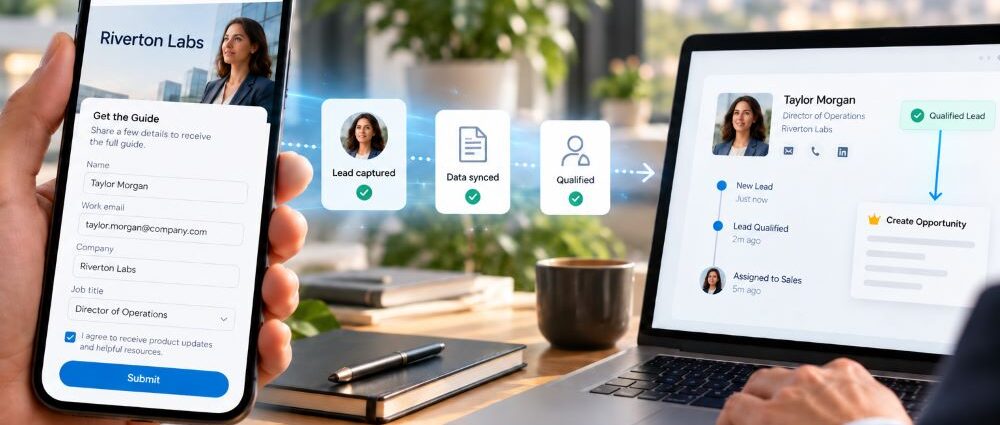
LinkedIn Lead Gen Forms remove one of the biggest conversion barriers in paid B2B campaigns: sending every prospect to an external landing page and asking them to type information LinkedIn already knows. A user can open the form inside LinkedIn, review prefilled details, answer additional questions, and submit without leaving the platform.
That convenience can improve lead capture, but it also creates a measurement problem. A completed form is easy to count; determining whether that person became a qualified lead, a sales conversation, or an opportunity takes more work. For teams already investing in broader B2B lead generation, the submission should be treated as the beginning of the process rather than the final conversion.
Strong campaigns connect field selection, attribution, CRM routing, follow-up, and sales outcomes. Once that path is visible, LinkedIn Lead Gen Forms become easier to judge by business value rather than submission volume alone.
What LinkedIn Lead Gen Forms Do in 2026
LinkedIn Lead Gen Forms are native forms attached to ads. When someone clicks the relevant call to action, LinkedIn opens the form inside the platform and can pre-populate contact and professional information using details from the member’s profile.
LinkedIn’s current Lead Gen Form documentation lists support across single image, carousel, video, event, message, document, and conversation ads. Advertisers can also use custom questions, confirmation messaging, post-submit calls to action, CRM or marketing automation connections, and retargeting audiences based on form engagement.
The journey is short:
- A LinkedIn member sees the ad.
- The member clicks the call to action.
- A native form opens with eligible data prefilled.
- The member checks or completes the requested information.
- The form is submitted.
- LinkedIn displays the confirmation step and optional next action.
- The lead can move into a CRM, automation platform, or manual export workflow.
Fewer steps can make completion easier, particularly on mobile. They do not compensate for weak targeting, an unclear offer, or poor positioning. A native form can make submission easier without making the resulting lead more relevant to sales.
LinkedIn Lead Gen Form Fields and Prefill
LinkedIn allows up to 12 fields in total on a Lead Gen Form, and up to three of them can be custom questions. First name, last name, and email address are pre-selected by default and count toward the form limit. LinkedIn recommends choosing roughly three to four fields when possible rather than filling the form to its maximum capacity.
That guidance makes sense when reducing submission effort is the priority, but the shortest possible form is not automatically the best B2B form. A content download and an enterprise demo request can justify very different levels of qualification.
How Many Fields Should You Use?
The useful question is not simply how many fields produce the highest completion rate. It is how much information is needed before the next step becomes productive.
A report download may need only basic contact details and one professional field. A demo request can justify company information, role, or a qualification question because sales needs enough context to respond intelligently. An extra field is worthwhile only when someone actually uses the answer later.
The following is a practical framework rather than an official LinkedIn rule:
| Offer Type | Suggested Visible Fields | Useful Qualification Field | Main Risk |
|---|---|---|---|
| Ebook or report | 3–4 | Job function or seniority | High volume with weak buying intent |
| Webinar | 3–5 | Company size or role | Registrations that never progress |
| Demo | 4–6 | Company size or business need | Excessive form friction |
| Consultation | 4–6 | Use case or timeframe | Asking too much before a conversation |
| Enterprise sales | 5–7 | Role, company size, or requirement | Losing viable prospects too early |
Prefill changes the tradeoff because many standard fields require little additional effort from the user. That helps on mobile, but it can weaken the behavioral signal behind the conversion.
A strong LinkedIn Lead Gen Form conversion rate therefore needs context. If a form becomes easier to submit and generates more contacts, the next question is whether those additional leads continue to qualify at an acceptable rate.
Hidden Fields and CRM Attribution
Visible fields describe the person. Hidden fields add information about the acquisition path and can help determine how the lead should be handled after submission.
LinkedIn allows up to 20 hidden fields per Lead Gen Form. They are not displayed to the member and do not collect additional member data. Instead, they can carry static values or dynamic campaign metadata into lead reports and, where supported, downstream systems.
LinkedIn’s hidden-fields documentation lists dynamic tracking parameters for account, campaign, ad set, and ad IDs and names. That makes it possible to preserve campaign context without creating a separate form for every ad variation.
Which Hidden Fields Are Worth Using?
Static hidden fields work well for internal labels such as business unit, region, offer category, source, or sales team. Dynamic values become more useful when one form runs across several campaigns and the CRM needs to retain that context automatically.
| Hidden Field | Example Value | Why It Helps |
|---|---|---|
| lead_source | linkedin_paid | Preserves channel attribution |
| campaign_id | Dynamic value | Creates a stable campaign reference |
| campaign_name | Dynamic value | Adds readable campaign context |
| offer_type | demo | Separates offer categories |
| sales_region | US-East | Supports routing |
| form_version | demo-v2 | Helps compare form changes |
| owner | enterprise-sdr | Supports assignment logic |
Good LinkedIn Lead Gen Form tracking depends on preserving this context after the submission leaves Campaign Manager. A CRM record labelled only as “LinkedIn lead” gives the reporting team little to work with later.
Campaign, offer, form, and routing data make it possible to compare acquisition paths with qualification and opportunity results. This matters especially when several campaigns reuse the same form.
From LinkedIn Form Submit to CRM
A Lead Gen Form becomes more useful when a submission reaches the system where the business already manages leads. LinkedIn supports integrations with marketing automation and CRM platforms, while advertisers without a supported connection can download lead data as CSV.
Getting a record into the CRM is only the first technical step. Fields need to map correctly, hidden values must arrive intact, and routing rules must assign the lead to the right person. A successful sync that creates an incomplete or unowned record does not solve the operational problem.
Test the Workflow Before Launch
LinkedIn provides test leads so advertisers can check whether captured data reaches reporting and connected systems. Its CRM integration guidance also notes that some third-party partners may not support profile-link fields, hidden fields, or custom checkboxes.
Before spending budget, check the whole route:
- visible fields arrive in the correct CRM properties;
- hidden fields survive the sync;
- custom questions map to usable fields;
- the lead is assigned to the correct owner or queue;
- campaign and source values remain attached;
- the intended workflow fires;
- sales or marketing receives the expected notification.
The test should continue beyond the first successful record creation. Source data can still be overwritten, ownership may remain blank, or a sales notification may fail even though the lead appears in the CRM.
CSV export is a useful fallback, but it introduces another manual step. That may be manageable for a low-volume campaign; it becomes a larger weakness when fast response or reliable routing matters.
A Form Submission Is Not a Qualified Lead
Lead Gen Forms make submissions easy to measure, which can encourage teams to optimize around the wrong milestone. A low cost per form submit looks attractive until most contacts fail to match the intended company profile, role, need, or level of interest.
Form Submit → CRM Lead → Enriched Lead → Qualified Lead → Sales Accepted Lead → Opportunity
The labels will differ between companies, but the underlying question remains the same: how many people who submitted the form survived the next meaningful stage?
Track the Lead Beyond CPL
This is where cost per qualified lead becomes more informative than form-level CPL alone. A campaign producing $100 form fills can be more expensive in practical terms than one producing $250 leads if the first campaign sends mostly poor-fit contacts to sales.
Useful post-submit metrics include:
- form completion rate;
- cost per form submission;
- cost per qualified lead;
- sales acceptance rate;
- opportunity rate;
- time from submission to first follow-up;
- pipeline or opportunity value created from the campaign.
LinkedIn lead quality often becomes clearer only after CRM qualification and sales feedback are added to campaign reporting. One audience may generate inexpensive submissions but very few accepted leads, while another looks costly at the form level and produces materially more opportunities.
Those outcomes should feed back into campaign decisions. A qualification question may filter out a recurring poor-fit segment, targeting may need to become narrower, or the real issue may be slow follow-up rather than media.
The same feedback can remove unnecessary fields. If CRM enrichment already provides company size or industry, asking the prospect for the same information adds little value.
What 2026 LinkedIn Lead Gen Form Benchmarks Show
Fresh benchmark data provides useful context, but LinkedIn CPL should not be reduced to one universal number. A content download and a sales conversation ask prospects to make different commitments.
A September 2026 Kiin study of LinkedIn Lead Gen Forms analyzed $13.6 million in spend across 489 advertiser accounts. The dataset covered 4,010 lead-generation campaigns, 4,875 forms, and 86,051 submissions from September 8, 2025 through September 7, 2026. Kiin reports medians across advertiser accounts, which keeps a few large spenders from dominating the headline figures.
| Metric | Kiin Dataset |
|---|---|
| LinkedIn Lead Gen Form spend | $13.6M |
| Advertiser accounts | 489 |
| Campaigns | 4,010 |
| Forms analyzed | 4,875 |
| Form submissions | 86,051 |
| Median content lead | $164 |
| Median demo or sales-call lead | $343 |
Content Leads and Demo Leads Are Different
The reported median content lead was $164, while the median demo or sales-call lead was $343. The gap is more informative than a single blended CPL because the two offers represent different levels of intent.
A person requesting a sales conversation can carry more commercial value than someone downloading a report, so a higher acquisition cost does not automatically mean weaker performance. The reverse comparison is just as risky: an inexpensive content lead does not show that LinkedIn can acquire sales-ready demand at the same price.
Industry, geography, seniority, audience size, offer quality, form design, and competition can all shift costs. The Kiin figures are reference points from one large dataset, not universal targets. Once a company has enough history, like-for-like comparisons between its own campaigns usually become more useful.
LinkedIn Lead Gen Forms vs Landing Pages
The choice between a native form and an external landing page is not simply a contest between higher and lower conversion rates. The two experiences give advertisers different levels of control over education, qualification, and measurement.
| Factor | LinkedIn Lead Gen Forms | Landing Pages |
|---|---|---|
| Friction | Lower | Usually higher |
| Prefilled data | Strong profile-based prefill | Usually limited |
| Mobile completion | Simple native experience | Depends on site quality |
| Design control | Limited | High |
| Qualification depth | Moderate | Potentially high |
| Behavioral tracking | More limited | Richer onsite behavior |
| Page education | Limited | Extensive |
| CRM integration | Supported through partner or export workflows | Depends on website stack |
| Best use case | Fast native capture | Complex persuasion or qualification |
Native LinkedIn Lead Gen Forms make sense when the audience already understands the offer and an extra website visit would mostly add unnecessary steps. Reports, webinars, event registrations, and clear demo propositions often fit that model.
A landing page becomes more attractive when the prospect needs substantial explanation before converting. Complex software, expensive professional services, unfamiliar products, or offers that rely on case studies and detailed proof may benefit from more space.
Additional effort is not always harmful. Requiring someone to understand a fuller proposition before completing a form can create a stronger intent signal when qualification matters more than raw volume.
The comparison should therefore extend beyond lead count. When possible, test both approaches against comparable audiences and evaluate sales acceptance, opportunity creation, and downstream value.
How to Build a Better LinkedIn Lead Gen Form in 2026
A good LinkedIn Lead Gen Form campaign should be designed backward from the outcome the business actually wants. If the goal is qualified sales conversations, optimizing only for inexpensive submissions can push the campaign toward more volume without improving commercial results.
The same principle applies to LinkedIn Lead Gen Form best practices more broadly. Field count, hidden data, CRM mapping, and follow-up should support the next stage of the funnel rather than being optimized as isolated settings.
- Define the conversion you actually want. Decide whether the campaign is seeking a content lead, webinar registration, demo, consultation, or another specific outcome.
- Keep visible fields focused. Collect only information genuinely needed at this stage.
- Add qualification selectively. Use custom questions where the answer changes routing, follow-up, or sales priority.
- Add hidden attribution fields. Preserve campaign, offer, source, form version, or routing context.
- Connect and test the CRM. Send a test lead and verify the complete flow before spending at scale.
- Assign follow-up ownership. Decide who receives the lead and what happens if it is not sales-ready.
- Measure qualified outcomes. Compare audiences and offers using downstream lead quality rather than form volume alone.
Weak performance often appears through combinations of metrics rather than one obvious failure. High completion with poor sales acceptance may indicate that the offer or form is too easy, while a low CPL with almost no opportunities can point toward broad targeting or low-intent content.
Other problems appear after submission. Strong-looking leads can go cold because follow-up is slow, qualification occurs too late, or CRM routing sends them to the wrong owner. Changing ad creative or adding another form field will not fix those failures.
Teams without the internal capacity to manage targeting, form testing, CRM connections, and downstream optimization may compare specialized B2B PPC agencies with an in-house setup. Outsourcing campaign management does not remove the need for internal agreement on qualification and routing.
When LinkedIn Lead Gen Forms Make the Most Sense
LinkedIn Lead Gen Forms work best when the business is ready to do something useful with the lead immediately after submission. The audience should be well defined, the offer understandable from the ad, and the next step clear enough that a long pre-conversion education process is unnecessary.
Common fits include:
- B2B SaaS;
- professional services;
- reports and webinars;
- product demos;
- account-based campaigns;
- events;
- high-consideration offers with a clear next step.
They are less convincing when a prospect needs extensive education before converting, qualification depends on complex branching, or onsite behavior is important to scoring. In those cases, a landing page or another capture method may provide better context even if it produces fewer initial conversions.
Operational readiness matters just as much as form design. A native form offers little advantage if leads wait hours or days for follow-up, attribution disappears during CRM sync, or sales cannot distinguish a content downloader from a serious demo request.
LinkedIn Lead Gen Forms are ultimately one capture layer inside a larger revenue process. Their value becomes visible when field strategy, attribution, CRM routing, sales follow-up, and qualification data connect to the same measurement system, allowing the campaign to be judged by what happens after the form is submitted.