
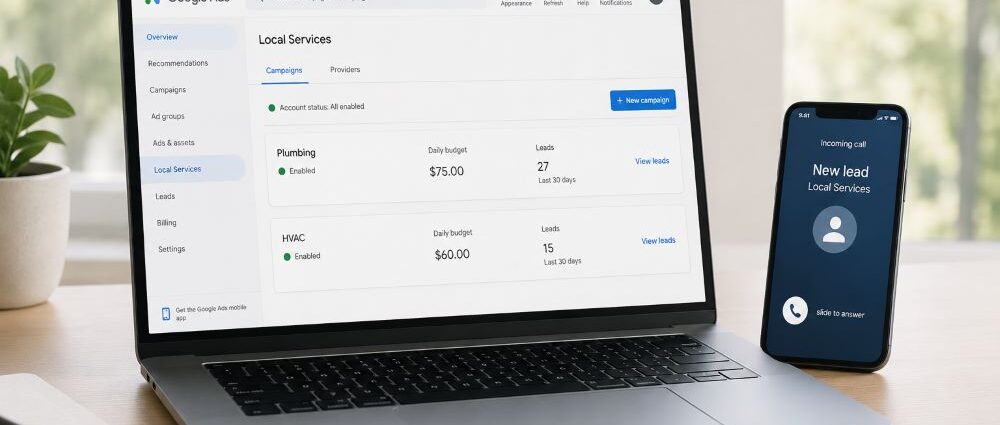
Google began moving selected U.S. Local Services Ads accounts into Google Ads in August 2026. The campaigns are shifting to a specialized Performance Max format with pay-per-lead goals, but the basic Local Services model remains familiar: advertisers still pay for valid leads, targeting stays keywordless, and ads continue to appear on Search and Maps.
Most of the practical changes happen behind the scenes. Campaign management moves into Google Ads, weekly budgets become daily averages, manual maximum cost-per-lead bidding disappears, and some Target CPA settings work differently.
There is also one change worth dealing with before anything else: historical Local Services Ads performance reports will not move into the new reporting environment. Businesses that want a reliable before-and-after comparison should preserve that data before their migration date.
Google outlines the rollout and technical details in its official Local Services Ads migration guidance.
Local Services Ads Are Not Becoming Regular Performance Max
The Performance Max label can be misleading here.
A migrated Local Services campaign is not the same thing as a standard Performance Max campaign spreading ads across YouTube, Gmail, Display, Discover, and Google’s other inventory. The new format remains designed specifically around local service leads.
| Local Services after migration | Standard Performance Max |
|---|---|
| Pay for valid leads | Primarily click/conversion-based advertising |
| Search and Maps | Multiple Google properties |
| Keywordless | Broader automated targeting |
| Built around local service categories | Built around broader conversion goals |
| Local business verification may apply | No equivalent Local Services verification model |
| Focused on local leads | Broader campaign objectives |
For plumbers and roofers, the economics are still local. Service area, response time, reviews, job type, and whether someone actually answers the phone all matter. Moving companies have an additional geographic problem because an inquiry outside the operating area may have almost no value.
So the migration changes where advertisers manage the campaign more than it changes the kind of customer they are trying to reach.
What Changes — And What Stays the Same
A few parts of the old LSA workflow survive almost untouched. Others change substantially.
| Before migration | After migration |
|---|---|
| Separate Local Services Ads dashboard | Campaign managed inside Google Ads |
| Pay per valid lead | Pay per valid lead |
| Search and Maps placements | Search and Maps placements |
| Keywordless targeting | Keywordless targeting |
| Weekly average budget | Daily average budget |
| Maximum CPL bidding may be available | Manual maximum CPL removed |
| Vertical-level Target CPA may be available | Campaign-level Target CPA |
| Historical LSA reports accessible | Historical reports do not transfer |
| Separate LSA lead management | Leads managed inside Google Ads |
| Existing verification | Verification transfers |
Service areas, categories, schedules, services, business photos, and verification information are designed to move with the account. Advertisers are not being asked to rebuild everything from scratch.
The unusual part is the reporting history. Campaign settings transfer; historical performance reports do not.
Which Advertisers Are Migrating First?
Google is handling the rollout in stages rather than setting one migration date for every Local Services advertiser.
August 2026
The first phase covers selected U.S. home and storefront service businesses, including plumbing, HVAC, electrical, appliance repair, house cleaning, lawn care, roofing, pest control, and moving.
That makes the change especially relevant to companies already combining LSA with standard paid search.
A business comparing a plumber PPC agency should now ask how the agency intends to manage Local Services campaigns inside Google Ads, not just how it structures ordinary Search campaigns.
The same question belongs in the conversation when evaluating roofing PPC agencies. LSA is becoming more tightly connected to the wider Google Ads management workflow.
Later in 2026 and 2027
Additional U.S. advertiser groups are expected to follow later in 2026, including more service-area businesses and accounts with more complicated configurations. Remaining categories and non-U.S. advertisers are expected to migrate later.
For an individual business, the notification inside its own account matters more than a general industry deadline.
What to Save Before Your LSA Dashboard Disappears
Historical reporting deserves attention before the migration date.
There is little value in exporting every metric simply because the dashboard offers it. Concentrate on the information you would actually need later to decide whether campaign performance changed.
A useful record would include:
- total spend
- total and charged leads
- average cost per lead
- monthly lead volume
- historical budget levels
- enough older data to recognize seasonal patterns
- lead or booking information used internally to judge quality
It is also worth recording the current campaign configuration: weekly budget, bidding settings, Target CPA values, service categories, service areas, operating hours, and ad schedule.
Screenshots are sufficient for settings that are awkward to export.
The point is not to create a museum of the old interface. You need enough information to answer a practical question a month later: did the campaign actually change, or are we simply looking at the same business through a new dashboard?
Without that reference, a movement in CPL or lead volume is much harder to interpret.
What to Do When the 14-Day Migration Notice Arrives
Google provides advance notice before moving an account. That gives advertisers enough time to prepare without spending two weeks constantly adjusting the campaign.
Days 14–10: Capture the Old Account
Export the historical reports you care about and record the current budget, bidding settings, service areas, categories, recent CPL, and typical lead volume.
A basic spreadsheet is enough. If your company tracks bookings or qualified calls outside Google, include those numbers too. They will often tell you more than raw lead volume once you start comparing pre- and post-migration results.
Days 9–4: Check What the Business Actually Sells Today
Service areas and operating priorities change over time. Review them before they are carried into the new setup.
Check whether the company still serves every listed area, whether all advertised services remain priorities, whether business hours and phone routing are current, and whether staffing can support the demand the campaign is trying to generate.
This can be particularly expensive for geographically constrained businesses. Moving companies face a similar issue in organic search, which is why service geography also plays such a large role in SEO for moving companies.
Days 3–0: Leave Stable Things Alone
If the account is functioning reasonably well, migration week is not the ideal moment to rebuild every campaign decision.
Changing the budget, service areas, landing pages, bidding logic, and operating schedule at once creates a messy comparison later. Fix genuine problems, but avoid creating extra variables simply because the interface is about to change.
Weekly Budgets Become Daily Budgets
One of the first differences advertisers will notice is cosmetic but potentially confusing.
Local Services Ads have traditionally shown a weekly average budget. Google Ads uses a daily average. During migration, Google converts the weekly figure by dividing it by seven.
A $1,400 weekly budget, for example, becomes:
Daily average: $200
Approximate monthly billing limit: $6,080
The monthly figure uses roughly 30.4 days.
Seeing $200 per day does not mean Google suddenly raised a $1,400 weekly budget. It is another way of expressing the same spending level.
Actual daily spend can still move up and down with demand. That makes the monthly limit and longer-term performance more useful than obsessing over one unusually expensive day.
Maximum Cost Per Lead Is Going Away
The bidding change is more significant.
Manual maximum cost-per-lead bidding will no longer be supported in the migrated setup, which gives automated bidding a larger role.
It is too early to know whether that will raise or lower lead costs across the market. Individual results will depend on competition, geography, service mix, seasonality, lead quality, and the advertiser’s starting point.
The useful comparison is the business’s own performance.
Suppose the old campaign averaged $70 per lead and the migrated campaign averages $120. That looks bad until the business discovers that the cheaper leads rarely booked while the more expensive ones produced profitable jobs.
The opposite can happen as well.
CPL still matters, but once reliable call and booking data exists, cost per qualified lead or cost per booked job usually tells a more complete story.
Multi-Service Businesses Need to Watch Target CPA
The Target CPA changes deserve particular attention from companies that advertise several trades or service divisions.
Consider a home-service company selling both plumbing and HVAC.
A routine plumbing repair and an HVAC replacement can have very different revenue, margin, closing rate, seasonality, and technician requirements. Using the same acquisition target for both may make little economic sense.
After migration, businesses that need genuinely different bidding targets may be better served by separate campaigns for separate verticals.
That decision should come from the company’s numbers. If plumbing and HVAC differ materially in average job value, margins, close rates, seasonality, or available crew capacity, separate targets become easier to justify.
Campaign structure is ultimately an expression of those economics, not an organizational exercise for keeping the Google Ads interface tidy.
What Transfers to Google Ads — And What Does Not?
Here is the practical migration summary.
| Item | Migration status |
|---|---|
| Target locations | Transfers |
| Service types | Transfers |
| Business categories | Transfers |
| Budget limits | Transfers and converts to daily format |
| Ad schedule | Transfers |
| Business photos | Transfers |
| Verification status | Transfers |
| Google Verified badge | Transfers for eligible businesses |
| Existing customer leads | Transfers |
| Message history | Transfers |
| Older call recordings | Transfers |
| Historical campaign performance reports | Does not transfer |
| Manual maximum CPL | No longer supported |
| Vertical-level Target CPA | Replaced by campaign-level target |
This distinction is easy to miss. Most of the information needed to keep advertising transfers automatically. The performance history needed to judge that advertising does not.
Businesses that care about year-over-year comparisons or want to investigate a post-migration change should deal with that before the old reporting view disappears.
Give the Migrated Campaign Time Before Judging It
A bad Tuesday is not a migration analysis.
Google advises allowing time for the transition to complete and campaign performance to settle. During the first couple of weeks, watch the account closely without treating every daily movement as a new long-term trend.
The most useful signals are likely to be total lead volume, daily spend, CPL, qualified lead rate, geographic mix, service mix, missed calls, and booking rate.
Compare those with the historical numbers you saved before migration.
Seasonality can easily distort the picture. A roofer dealing with a major storm, an HVAC company entering a heatwave, or a mover approaching a busy weekend may see a sudden change in demand that would have happened regardless of the platform update.
Two weeks of new data also should not be compared blindly with a six-month historical average. Try to use comparable periods and account for obvious demand shifts.
Lead Management Moves Into Google Ads Too
Campaign management is only one part of the consolidation. Local Services leads also move into the Google Ads environment.
That may simplify the workflow for businesses already managing Search campaigns there, but it raises a mundane question that is easy to overlook: who actually needs access?
The person adjusting advertising budgets may not be the employee who listens to calls, replies to messages, reviews bad leads, or books appointments.
Before migration, check permissions for everyone involved in the lead process. A company can have a perfectly configured advertising account and still waste expensive leads because the operational handoff is poor.
Putting advertising and lead information in the same platform helps only when someone is actually using that information.
Can You Create New Pay-Per-Lead Campaigns Directly in Google Ads?
Not yet.
As of August 2026, a new Performance Max campaign with pay-per-lead goals cannot simply be launched through the normal Google Ads campaign-creation flow.
New Local Services advertisers and businesses adding eligible campaigns still begin through the Local Services signup process. Google plans to bring more of that setup directly into Google Ads later.
This is one of the details most likely to date quickly.
If you return to this guide later in 2026 or in 2027, check the current setup flow before following an older step-by-step tutorial. Screenshots published during a platform transition can become inaccurate surprisingly fast.
Google Verified Is the Badge to Know
Businesses that already completed the required screening do not have to restart the verification process simply because their Local Services campaign moves into Google Ads.
The current verification branding is Google Verified. Eligible advertisers can display the badge after completing the required checks, and existing verification information moves with migrated accounts.
Google explains the current badge and eligibility model in its Google Verified guidance.
Older Local Services material may still talk extensively about Google Guaranteed. That terminology can describe an earlier version of the program rather than the current 2026 setup, so checking the publication date matters when using older tutorials or agency documentation.
What the Migration Means for Local Businesses
Local Services Ads are staying. The larger change is that Google is pulling them into the same management environment used for its other advertising products.
For most advertisers, there is no reason to treat migration as an emergency. Preserve the historical data that will not follow the account, check that service areas and operating details are still accurate, understand what is happening to bidding and budget controls, and then give the migrated campaign enough time to produce meaningful data.
The difficult part comes after that.
A business still needs to know which services deserve more spend, where profitable customers come from, what a qualified lead is worth, and how many advertising calls actually become scheduled work.
The migration itself is largely automatic. Judging whether the new campaign is producing the right calls, in the right areas, for services that make financial sense is not. Businesses that preserve their old numbers and understand those economics will have a much easier time deciding what really changed after the move to Google Ads.