
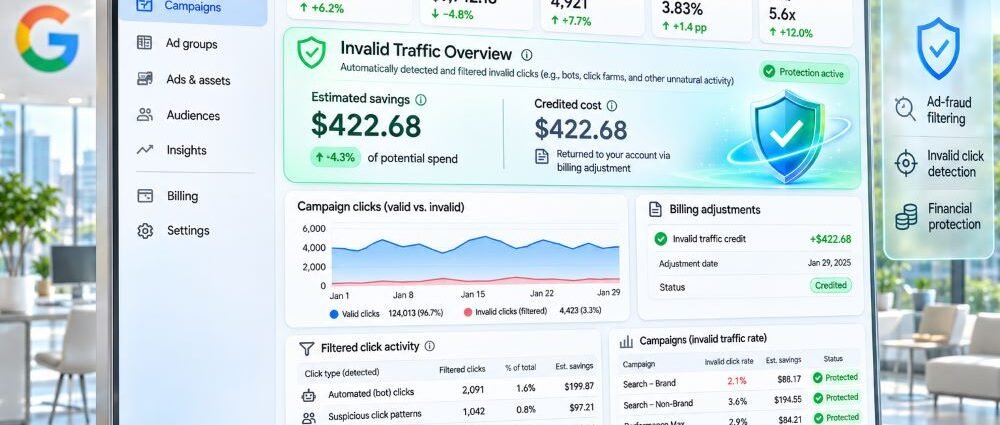
Google Ads now shows advertisers what its invalid-traffic protections may have saved before billing and what the company credited after detecting invalid activity later. The Google Ads Invalid Traffic Overview Card, introduced on November 12, 2026, places those amounts together, but they answer different questions. One estimates charges Google prevented; the other tracks credits against charges from an earlier billing period.
That distinction matters when reviewing campaign costs. Neither figure measures every suspicious website visit, proves that all form submissions are genuine, or tells an advertiser how much revenue invalid traffic prevented; use the card alongside campaign reports, billing records, and lead-quality data.
What the Google Ads Invalid Traffic Overview Card Shows
Google announced the Invalid Traffic Overview Card in November 2026 as a new way to make existing traffic protections visible. Its systems use automated filtering and manual reviews to identify activity that does not reflect genuine interest, including bot traffic, accidental clicks, and certain intentionally misleading interactions. The card summarizes two financial effects over the selected reporting period.
Estimated Savings vs. Credited Cost
| Card metric | What it represents | What it does not mean |
|---|---|---|
| Estimated savings | Google’s estimate of invalid-traffic costs avoided through proactive protections | Money later refunded to the advertiser, or an amount to subtract again from reported spend |
| Credited cost | Credits for invalid activity detected after the relevant billing period ended | The total value of all filtered traffic, or a count of every poor-quality lead |
Google removes traffic it identifies as invalid before the billing cycle closes from campaign metrics and the bill. For later findings, it issues credits where appropriate and possible. The resulting credited amount can be much smaller than estimated savings. Most filtering occurs earlier, and the two numbers are not expected to match.
The card does not publish a universal invalid-traffic rate or reveal the individual interactions behind detection, so it is not a click-by-click fraud audit. Google reported a 30% average reduction in advertiser exposure to invalid leads from 2026 system upgrades, not a result attributable to an individual account or this card.
Where to Find the Invalid Traffic Card in Google Ads
Open Google Ads and navigate to Campaigns → Overview. Locate the Invalid traffic card to see estimated savings and credited cost for the selected date range. Select View details to inspect the daily trend, campaign-level breakdowns, and links to relevant invoices for previous credits. Google’s invalid-traffic documentation explains those controls and the separate reporting options.
A credit can appear in a later billing period than the interaction that generated it, so the dates deserve attention. Matching a daily graph to one month’s invoice without checking the associated service month may create an apparent discrepancy, especially near month-end.
What to Do If the Card Is Missing
Google is rolling out the feature gradually, so an account may not display it yet. First check Campaigns → Overview rather than the Billing screen, and verify that you are viewing the intended Google Ads account. If the card is absent, use existing Invalid clicks columns and billing records; do not assume that missing UI means Google stopped filtering invalid traffic.
There is no documented universal switch that forces the new card to appear, and its absence does not mean the account received no credits. Billing adjustments and campaign columns remain separate ways to inspect activity while the rollout progresses.
Invalid Traffic Card vs. Invalid Clicks Reporting
The card expresses protection in monetary terms. The Invalid clicks column reports a count of clicks Google’s systems already identified and filtered; these are not additional billable clicks to remove manually. To find the column, open Campaigns, select Columns, search for Invalid clicks, and apply the selection.
More invalid clicks mean more activity was filtered, not necessarily worse fraud or defective targeting. Click volume can also rise because of legitimate seasonal demand, changes to budgets, or new inventory. Evaluate trends against campaign changes and comparable periods instead of using an isolated number as a verdict.
The three views are not interchangeable. Invalid clicks counts filtered click events; estimated savings approximates costs prevented by broader protections; and credited cost refers to money credited after a billing period closes. Their units and timing differ. Neither estimated savings nor Invalid clicks should be added to the credits as if all three were refunds.
How Invalid Activity Credits Affect Campaign Costs
For invalid activity identified after month-end, Google records a credit as a billing adjustment. Open Billing → Summary, find the Month card, and look for Invalid activity under Adjustments. Invoice and transaction details can help connect the adjustment to the earlier month and relevant campaigns.
Google freezes ordinary campaign metrics at month-end, so a later credit does not retroactively change that month’s standard campaign Cost column. For a campaign-level view after credits, use the Invalid Activity Credit Report. The report can show credited amounts, credited clicks and interactions, and adjusted measures, including Adjusted cost and Adjusted cost / conv. Google currently makes this report available for Search and Performance Max campaigns.
Where to Find the Invalid Activity Credit Report
Go to Campaigns → Report Editor, open Template gallery, and select Invalid Activity Credit Report: Search & PMax. Review the default credited metrics and add adjusted metrics where useful. Compare the date and campaign identifiers with the corresponding billing adjustment before drawing conclusions about performance.
Consider an illustrative Search campaign with $1,000 of invoiced cost for a completed period and a subsequent $40 invalid-activity credit attributable to that period. The adjusted cost is $960. If the card also displays $120 in estimated savings, do not calculate $840: the $120 represents costs already prevented before billing and was not part of the $1,000 invoiced amount.
This illustration is not Google performance data. In a real account, credits may relate to prior service months, include interactions beyond clicks, and involve small rounding differences. Check the report’s adjusted metrics rather than manually applying one account-level credit to every campaign.
Why the Card Does Not Measure Every Invalid Lead
Google’s invalid-traffic controls operate around ad interactions and billing. A person or bot may still reach a landing page, while a real visitor can submit false contact details. Google cannot independently verify what happens after a click in your website forms or CRM, so the new card does not measure the complete volume of unusable sales leads.
That creates three separate layers of evidence. Before billing, Google filters interactions and estimates prevented costs. After billing, it may apply credits for later findings. After the click, the business must evaluate whether submissions are authentic, reachable, qualified, and commercially useful. These layers form a practical analysis framework, not an official Google taxonomy.
A campaign could show few invalid-traffic credits yet receive many unqualified inquiries: poor sales fit is not automatically invalid ad traffic. Conversely, a high estimated-savings amount does not mean an equivalent volume of bad leads entered the CRM. For an account-level diagnosis, connect verified outcomes to Google Ads lead quality tracking rather than treating the card as a substitute for sales feedback.
How to Review Suspicious Google Ads Traffic
Start with the affected campaign and time period. Check Invalid clicks, changes in search terms or placement exposure, location settings, and recent campaign edits. Compare those observations with landing-page logs and the quality of the forms or calls received. Short visits or shared IP addresses warrant examination, not a fraud verdict.
If concerns remain, Google accepts an invalid-traffic investigation request for activity within the previous 60 days. Prepare the customer ID, dates, campaign or ad group names, suspicious keywords, and relevant server logs. Google also requests click identifiers (GCLIDs) where available; for lead issues, a record of contact attempts and lead outcomes can provide additional context. Limit personal data to what the investigation requires.
Use the Click Quality Form in Google’s documentation. The review does not guarantee a credit or a click-by-click explanation, because Google does not disclose all detection signals. Meanwhile, protect your forms with appropriate validation, anti-bot safeguards, and meaningful conversion goals. For a business focused on sales outcomes, cost per lead versus cost per qualified lead is often a more useful operational comparison than raw form volume.
What Advertisers Should Check Before Changing Campaigns
A high estimated-savings value is not a reason to cut bids automatically; it may reflect activity Google already prevented from being charged. A low credited-cost figure does not prove that every visit or submission was valuable. Before changing budgets, confirm the period being reviewed, the applicable billing adjustments, any traffic already excluded from campaign reports, and downstream lead or sales quality.
Separate measurement changes from targeting decisions where possible. If you alter campaign budgets or inventory while investigating traffic, note the dates so normal performance shifts are not misattributed to invalid-traffic filters. The same care applies to Google Ads channel prioritization, which changes where eligible campaign budget can flow rather than how invalid activity credits work.
The Google Ads Invalid Traffic Overview Card gives advertisers a clearer account of two financial safeguards, not a universal measure of advertising fraud. Read estimated savings as prevented charges, credited cost as later billing corrections, and website lead quality as a separate business outcome. Taken together with campaign reports and invoices, those distinctions make the new card genuinely useful for evaluating spend without counting the same protection twice.